Sysinfo Logging
This article shows my approach to periodically record my server load with minimum overhead. A system timer executes a C program writes the system information into a page and cluster aligned file. The file is then downloaded from server to client and rendered using Javascript in HTML-SVG.
System information, sysinfo, CPU load, RAM, Swap, System call, Record, Memory page, Disk cluster, File map, C language, Javascript, SVG, Systemd-timer
--by Captdam @ Oct 28, 2026Index
I had my old server running Longview for several years. Recently, I installed my website on a new Linode server with a new Ubuntu distribution version, but I am having bad luck installing Longview. After some troubleshooting and headache, I decided to stop. After all, it is just a system performance logging program, why can't I write my own?
The free plan of Longview records system loads every 5 minutes, for up to 12 hours of data retention, paid plans records every minute and provide unlimited data retention. However, If I write my own, I can have higher resolution (up to every second) and unlimited data retention with no cost, except some CPU time and disk storage on my server.
Record Information
The first question is, what should I record?
Definitely, I need to record CPU usage, RAM usage and swap usage. The CPU usage tells us how much request we can serve at what rate; the RAM and swap usage tells us whether we are facing a potential out-of-memory problem. (There was once my server running out of memory and my websites were down for a day; therefore I am concerned about this issue.)
Since my server is dedicated to serve websites, the main load on this server is PHP-FPM. Therefore, I think there is no need to record the task tree. In terms of FPM status (fpm_get_status()), I will put it in another tool.
Record File Structure
I will save the system information record in a file. This file contains a header, which includes:
-
Information about this record file, such as number of data entries in this file.
-
Fixed system information, such as total RAM and swap size. Definitely, the total RAM and swap size will not change during run-time.
, followed by an array of data entries:
-
The system information at a specific time, such as CPU usage.
#define DATA_COUNT 255
typedef struct {
	header_t header;
	data_t data[DATA_COUNT];
} buffer_t;
The data entries array acts like a ring buffer. We write the first entry at time 1, then write the second entry at time 2. Once all data entries are written, we warp back to the first entry. An index specifies the next entry to write data_wp is stored in the header. The following table illustrates the ring buffer architecture:
| Offset | Content |
|---|---|
| Header | data_wp = 3 |
| Entry 0 | Record [t-3] |
| Entry 1 | Record [t-2] |
| Entry 2 | Record [t-1] |
| Entry 3 | Record [t] |
| Entry 4 | Record [t+1-DATA_COUNT] |
| ... | ... |
| Entry DATA_COUNT-1 | Record [t-4] |
With the ring buffer design, we only write the header and the specific entry. Compared to regular FIFO where we must shift every entry in the buffer, the ring buffer needs minimum number of writes, hence provides the best performance.
We will manually implement the ring buffer in C language:
buffer_t* buffer = getRecordFile();
header_t* header = &(buffer->header);

data_t* data = &(buffer->data[header->data_wp]);
data->something = getSomething();
header->data_wp = header->data_wp == DATA_COUNT - 1 ? 0 : header->data_wp + 1;
Note, the number of data entries is NOT a power of 2. We use header->data_wp = header->data_wp == DATA_COUNT - 1 ? 0 : header->data_wp + 1 instead of header->data_wp = (header->data_wp + 1) & (DATA_COUNT - 1) to wrap back the index.
In our record file implementation, the record file is aligned with the system memory page size and disk cluster size. In another word, what is a power of 2 is the size of the record file, not the number of data entries.
Sysinfo
On Linux, we can get the memory information by reading the system "files" /proc/meminfo:
cat /proc/meminfo

MemTotal:         979328 kB
MemFree:          119688 kB
MemAvailable:     623512 kB
Buffers:           70664 kB
Cached:           544036 kB
SwapCached:        19616 kB
...
and get the CPU load by reading /proc/stat:
cat /proc/stat

cpu  742019 33020 1270627 216150208 151630 0 12232 156155 0 0
cpu0 742019 33020 1270627 216150208 151630 0 12232 156155 0 0
intr 306200231 94 9 0 0 1624 0 0 0 1 0 0 0 15 0 0 0 0 0 0 0 0 0 0 0 0 0 0 15204220 0 7117751 8178783 0 0 0 0 0 0 0 0 0 0 0 0 0 0 0 0 0 0 0 0 0 0 0 0 0 0 0 0 0 0
...
For example, the following PHP script parses memory information:
function getSizeRaw(string $value): int {
	$t = trim($value);
	if (substr($t, -2) == 'kB') {
		return 1024 * substr($t, 0, -2);
	} else if (substr($t, -2) == 'MB') {
		return 1024 * 1024 * substr($t, 0, -2);
	} else if (substr($t, -2) == 'GB') {
		return 1024 * 1024 * 1024 * substr($t, 0, -2);
	}
	return (int)$t;
}

$data = [];
foreach(file('/proc/meminfo', FILE_SKIP_EMPTY_LINES) as $x) {
	[$name, $value] = explode(':', $x);
	switch (trim($name)) {
		case 'MemTotal':	$data['total'] = getSizeRaw($value);		break;
		case 'MemFree':		$data['free'] = getSizeRaw($value);		break;
		case 'MemAvailable':	$data['avail'] = getSizeRaw($value);		break;
		case 'SwapTotal':	$data['swaptotal'] = getSizeRaw($value);	break;
		case 'SwapFree':	$data['swapfree'] = getSizeRaw($value);		break;
	}
}
The C standard library (libc) provides a system call sysinfo() that allows us to get the current system information without manually parse the system file, including:
-
Uptime.
-
Process count.
-
CPU load (1-, 5- and 15-minute averages).
-
Total RAM and swap size.
-
Free, shared and buffer RAM.
-
Free swap.
In addition, 64-bit platform includes:
-
Total high memory size.
-
Free high memory.
Size Optimization
The sysinfo() system call returns a structure:
// 32-bit
struct sysinfo {
	long uptime;             /* Seconds since boot */
	unsigned long loads[3];  /* 1, 5, and 15 minute load averages */
	unsigned long totalram;  /* Total usable main memory size */
	unsigned long freeram;   /* Available memory size */
	unsigned long sharedram; /* Amount of shared memory */
	unsigned long bufferram; /* Memory used by buffers */
	unsigned long totalswap; /* Total swap space size */
	unsigned long freeswap;  /* Swap space still available */
	unsigned short procs;    /* Number of current processes */
	char _f[22];             /* Pads structure to 64 bytes */
};

// 64-bit
struct sysinfo {
	long uptime;             /* Seconds since boot */
	unsigned long loads[3];  /* 1, 5, and 15 minute load averages */
	unsigned long totalram;  /* Total usable main memory size */
	unsigned long freeram;   /* Available memory size */
	unsigned long sharedram; /* Amount of shared memory */
	unsigned long bufferram; /* Memory used by buffers */
	unsigned long totalswap; /* Total swap space size */
	unsigned long freeswap;  /* Swap space still available */
	unsigned short procs;    /* Number of current processes */
	unsigned long totalhigh; /* Total high memory size */
	unsigned long freehigh;  /* Available high memory size */
	unsigned int mem_unit;   /* Memory unit size in bytes */
	char _f[20-2*sizeof(long)-sizeof(int)];
};
On a 32-bit platform, this structure is 64 bytes long; on a 64-bit platform, this structure is 112 bytes long.
For most computers, long is 32-bit wide on 32-bit platform and 64-bit wide on 64-bit platform; int is 32-bit wide on both platform; short is 16-bit wide on both platform.
On 64-bit platform, padding may be added after procs to ensure long totalhigh is aligned to be readable.
In some case, the structure size may differ on different platforms, even both platforms are 64-bit, because there is no universal agreement for width of int and long. Personally, I would perfer use data type with defined width, such as int32_t and uint64_t.
To save storage space, and to increase the performance of this record program, I decided to minimize the data structure size:
typedef struct {
	uint16_t data_wp, data_total;
	uint16_t ram_total, swap_total;
	uint16_t data_blocksize;
	uint16_t _pad[3];
} header_t;

typedef struct {
	uint32_t uptime;
	uint16_t process;
	uint8_t load1, load5;
	uint16_t ram_free, ram_shared, ram_buffer, swap_free;
} data_t;
For data related to the system information:
-
Uptime
uint32_t-uint32_thandles at maximum 4294967295 seconds, or 136 years. It is uncommon to have a server running for more than a hundred years without rebooting.uint16_tis too short (18 hours),uint64_tis an overkill. -
Process
uint16_t-uint16_thandles up to 65535 processes, which is sufficient. Although/proc/sys/kernel/pid_maxon my machine reports 4194304, most time I have only 150 to 200 processes running.struct sysinfoalso usesunsigned shortfor this information, which is 16-bit wide. -
Load
uint8_t- I will record the 1-minute and 5-minute averages at 0.4% resolution, so, full load is 250 times 0.4%.uint8_tfits this purpose.Unfortunately, I am running out of space to record the 15-minute average. All 16 bytes of
data_thad been used. I am not willing to expanddata_tto 32 bytes just to add one 8-bit data. In terms of borrowing 8 bits fromuptime, leaving it 24-bit space, which will overflow every 194 days. So, I discard the 15-minute average. -
RAM and swap size (total and free)
uint16_t- It doesn't make sense to record the actual size, I will need to useuint64_tif any of them exceeds 4GB. Instead, I will record block number. For example, I can define a block to be 128kB; then, I record 6GB as 49152 (6GB / 128kB = 49152), which can be fit into the space ofuint16_t. -
Block size
uint16_t- The block size should be recorded in the header. Since the minimum memory page size and minimum disk cluster size are both 4kB on nearly all systems, I only record the number of 4kB pages in a block. For example, I will record a 128kB block as 64 (128kB / 4kB = 64), which can be fit into the space of uint16_t.The block size defines the resolution of our record program when dealing with RAm and swap. For example, if the block size is 128kB and the free RAM is 520kB, we will record 512kB (after rounding).
Compare to the size, the rounding error is insignificant. There is no practical meaning for high accuracy RAM and swap size.
For data related to the record file:
-
Total number of records
uint16_t-uint16_thandles up to 65535 records. -
Next data entry to write (as an index)
uint16_t- Use asarray[data_wp], use the same data type asdata_total.
In this way, the header is 16 bytes long, and each data entry is 16 bytes long. Up to 255 data entries can be fit into a 4kB space; up to 4095 data entries can be fit into a 64kB space.
We want to use as few disk clusters and memory pages as possible. This not only saves RAM and disk usage, but also speeds up file open, memory write and file save when we record the system information. We do not want the system information logging program to eat too much system resources.
4kB is the magic number. It is the memory page size (without using a huge page), meaning it consumes the minimum amount of RAM. Even if we use a smaller number, the system must allocate at least this much RAM to our program because the virtual memory is allocated by memory page. Furthermore, it is the disk cluster size, meaning it consumes a single disk IO operation to read or write the record file. Using a smaller number doesn't save IO (instead it may increase IO, because we need to read-modify-write the entire cluster), using a larger number requires extra IOs.
Record Frequency and Length
Following is a worksheet of record file size (number of entries), record frequency vs record duration:
| File size | Entries | Frequency | Duration |
|---|---|---|---|
| 4kB | 255 | 1 second | 4 minutes 15 seconds |
| 4kB | 255 | 6 minutes | 25 hours 30 minutes |
| 64kB | 4095 | 6 minutes | 17 days |
| 64kB | 255 | 0.5 hours | 85 days |
| 1MB | 65535 | 1 hours | 7.5 years |
Record Program
We will write a program that records the current system information into the record file in C language.
This program should be periodically executed by a system timer, such as systemd-timer or cronjob. This simplifies the program and provides more flexibility compared to writing a long-running background daemon that periodically records the system information by itself.
Data Structure
#define FILE_SIZE 4096 // 65536 // Better align with memory page size and disk cluster size
#define DATA_COUNT 255 // 4095 // Cross check with FILE_SIZE, FILE_SIZE = 16 + 16 * DATA_UNITSIZE
#define DATA_UNITSIZE ((uint64_t)(64 * 4096))

typedef struct {
	uint16_t data_wp, data_total;
	uint16_t ram_total, swap_total;
	uint16_t data_blocksize;
	uint16_t _pad[3];
} header_t;

typedef struct {
	uint32_t uptime;
	uint16_t process;
	uint8_t load1, load5;
	uint16_t ram_free, ram_shared, ram_buffer, swap_free;
} data_t;

typedef struct {
	header_t header;
	data_t data[DATA_COUNT];
} buffer_t;

int main(int argc, char** argv) {
	static_assert(sizeof(data_t) == 16, "Data size must be 16");
	static_assert(sizeof(header_t) == 16, "Header size must be 16");
	static_assert(sizeof(buffer_t) == FILE_SIZE, "Buffer size mismatch with data count");
	static_assert(DATA_UNITSIZE / 4096 <= 65535, "Data unit cannot fit into uint16_t");
Define the record file data structure. The record file can be represented by buffer_t, it includes one header header_t header, followed by an array of data entries data_t data[DATA_COUNT].
The header includes:
- Number of data entries.
- Next data entries to write (index).
- Total RAM size (unit: block).
- Total swap size (unit: block).
- RAM and swap block size (unit: 4kB).
- Padding to 16 bytes.
Each data entry contains:
- Uptime (seconds since boot).
- Process count.
- 1-minute and 5-minute average CPU loads (out of 250).
- Free, shared and buffer RAM, free swap (unit: block).
At compile time, we will ensure that:
-
Both the header and the data entry size is 16 bytes long.
-
Record file size
FILE_SIZEand number of data entriesDATA_COUNTmatches (FILE_SIZE = 16 + 16 * FILE_SIZE). This is to cross check when I make any change to the size. It ensures I know I am making the size aligned. -
RAM and swap block size
DATA_UNITSIZE(in the unit of 4kB) can be fit intouint16_t. Max allowed block size is 262140MB (65535 * 4kB).
Measure the Current System Information
	struct sysinfo sys_info;
	if (sysinfo(&sys_info)) {
		fprintf(stderr, "Cannot get sysinfo err: %d.\n", errno);
		return -1;
	}
	uint64_t ram_total = (uint64_t)(sys_info.totalram) * sys_info.mem_unit, ram_write = ram_total / DATA_UNITSIZE;
	uint64_t swap_total = (uint64_t)(sys_info.totalswap) * sys_info.mem_unit, swap_write = swap_total / DATA_UNITSIZE;
	if ( ram_write > (uint16_t)-1 || swap_write > (uint16_t)-1 ) {
		fprintf(stderr, "DATA_UNITSIZE (%"PRIu64") too small, allow max %"PRIu64" - RAM needs %"PRIu64" Swap needs %"PRIu64"\n", DATA_UNITSIZE, (uint64_t)(DATA_UNITSIZE * (uint16_t)-1), ram_total, swap_total);
		return -1;
	}
Use system call sysinfo() to get the current system information.
Perform a run-time check for the RAM and swap size space requirement. If the total RAM size or the total swap size (in the unit of block) cannot be fit into uint16_t, this program will halt.
Because the total RAM will always be greater than the free, shared and buffer RAM, and the total swap will always be greater than the free swap, we only need to check the total RAM and total swap. Furthermore, the total RAM and total swap size will never change, if the total RAM size or total swap size cannot be fit into uint16_t, this issue will be exposed in the first time we run this program. We can tweek the block size then.
Open Record File
	if (argc != 2) {
		fprintf(stderr, "Buffer filename not provided.\n");
		return -1;
	}
	int file = open(argv[1],
		O_RDWR | O_CREAT,
		S_IRUSR|S_IWUSR | S_IRGRP | S_IROTH
	);
	if (file < 0) {
		fprintf(stderr, "Cannot open file err: %d.\n", errno);
		return -1;
	}
	if (flock(file, LOCK_EX) < 0) {
		fprintf(stderr, "Cannot lock file err: %d.\n", errno);
		return -1;
	}
	if (ftruncate(file, sizeof(buffer_t)) < 0) {
		fprintf(stderr, "Cannot allocate buffer file err: %d.\n", errno);
		return -1;
	}

	buffer_t* buffer = mmap(NULL, sizeof(buffer_t), PROT_READ | PROT_WRITE, MAP_SHARED | MAP_POPULATE, file, 0);
For better performance, we will use file descriptor (int file = open()) instead of file pointer (FILE* fp = fopen()) to access the record file.
We open this file in read-write mode. If this file does not exist (first run), create it. Allow read and write for self, allow read only for group and others.
We must give read access to others if we want to allow another program to read the system information record.
Obtain an advisory write file lock on the record file. This prevents us from writing the file while others are reading, and others from reading this file while we are writing.
Truncate (also means expand) this file to the desired length. This is mainly used for newly created record files. Because our record file has a fixed length FILE_SIZE, it is better to allocate this much size at the beginning, in one shot. Therefore, we do not need to dynamically allocate space as we write, which is slow and has a higher risk of failure.
Map the record file into memory in read-write mode (same as when we open the record file). Make it shared, so any change made by our program can be reflected outside. Populate the buffer to prevent future page fault.
A defined and fixed buffer in memory is always the safest place to work.
Generate File Header (First Run)
	header_t* header = &(buffer->header);

	if (header->data_total == 0) {
		fprintf(stderr, "Create file.\n");
		header->data_wp		= 0;
		header->data_total	= DATA_COUNT;
		header->data_blocksize	= DATA_UNITSIZE / 4096; // of 4k page
		header->ram_total	= ram_total / DATA_UNITSIZE;
		header->swap_total	= swap_total / DATA_UNITSIZE;
	}
The record file does not exist if it is the first time running this program. In this case, we create the record file and populate it to desired size in the previous step. When populating the newly created record file, zero if filled. We can check whether the record file is newly created by reading the header portion. I decided to read the number of entries header->data_total in the header. If it is zero, the record file is newly created.
For a newly created record file, we need to populate the following information:
-
The write index. At initialization, we will use 0, which means the next data entry to write is in slot 0.
-
Number of data entries.
-
RAM and swap block size, in the unit of 4kB.
-
Total RAM and swap size, in the unit of block.
We use uint16_t to record this information to save space. We must cast the data into larger data types, such as uint64_t while processing them; otherwise, the C compiler will use the original data type, which is uint16_t while processing them, risking overflow. We only truncate them to uint16_t when writing them to memory.
Write the System Information
	float load1 = 250.0f * sys_info.loads[0] / get_nprocs() / (1<<SI_LOAD_SHIFT); // out of 250
	float load5 = 250.0f * sys_info.loads[1] / get_nprocs() / (1<<SI_LOAD_SHIFT); // out of 250

	data_t* data = &(buffer->data[header->data_wp]);
	data->uptime		= sys_info.uptime; // Need more than tens of years uptime?
	data->process		= sys_info.procs > (uint16_t)-1 ? (uint16_t)-1 : sys_info.procs;
	data->load1		= load1 > 255 ? 255 : load1;
	data->load5		= load5 > 255 ? 255 : load5;
	data->ram_free		= (uint64_t)(sys_info.freeram) * sys_info.mem_unit / DATA_UNITSIZE;
	data->ram_shared	= (uint64_t)(sys_info.sharedram) * sys_info.mem_unit / DATA_UNITSIZE;
	data->ram_buffer	= (uint64_t)(sys_info.bufferram) * sys_info.mem_unit / DATA_UNITSIZE;
	data->swap_free		= (uint64_t)(sys_info.freeswap) * sys_info.mem_unit / DATA_UNITSIZE;

	header->data_wp = header->data_wp == DATA_COUNT - 1 ? 0 : header->data_wp + 1;
Use the write index &(buffer->data[header->data_wp]) to create a pointer to the entry to write.
-
CPU Load
The
sysinfo()system call returns the system load inunsigned long.This number contains the sum of load of all cores; hence, it may be greater than 100% on a multi-core platform. To find the average per core load, divide this number by number of cores, by using
get_nprocs().The range of the CPU load can be represented by
1<<SI_LOAD_SHIFT. We will divide the per core CPU load by this number. This results in a unit per core load, its range between 0 to 1.Since we are using
uint8_tto record the CPU load, which has a range of 0 to 255. We multiply the unit per core load by 250, which gives us a number between 0 to 250, that is a resolution of 0.4%. To prevent any overflow and to reduce rounding issue during the process, we will need to use floating point numbersfloat, single precision is sufficient.When write the CPU load to memory in
uint8_t, clamp it to 0 to 255, just in case CPU load goes above 100%. -
Uptime
Truncate the uptime to 32-bit unsigned integer. This allows up to 136 years of non-stoping running, which is sufficient. Nobody runs a server this long without a reboot.
-
Process Count
If
sysinfo()system call reports more than 65535 processes, clamp it to 65535. This is not likely to happen, because thestruct sysinfoalso usesunsigned shortfor this information, which is 16-bit wide. -
RAM and Swap
Record the free RAM, shared RAM, buffer RAM and free swap, in units of block.
At the end, increment the write index. Wrap the index back to 0 if it reaches the end of the ring buffer.
Following code is added during debugging to inspect the recorded data, note the first run creates the record file:
	fprintf(stdout, "data_total %"PRIu32" Write pointer to %"PRIu32" %p %p.\n", header->data_total, header->data_wp, buffer, data);
	fprintf(stdout, "uptime %"PRIu32"\n", data->uptime);
	fprintf(stdout, "- process %"PRIu16"\n", data->process);
	fprintf(stdout, "- load %"PRIu8" %"PRIu8"\n", data->load1, data->load5);
	fprintf(stdout, "ram_total %"PRIu16"\n", header->ram_total);
	fprintf(stdout, "- ram_free %"PRIu16"\n", data->ram_free);
	fprintf(stdout, "- ram_shared %"PRIu16"\n", data->ram_shared);
	fprintf(stdout, "- ram_buffer %"PRIu16"\n", data->ram_buffer);
	fprintf(stdout, "swap_total %"PRIu16"\n", header->swap_total);
	fprintf(stdout, "- swap_free %"PRIu16"\n", data->swap_free);
	fprintf(stdout, "x %"PRIu16" x 4kB\n", header->data_blocksize);
./sysinfo_log4k.elf 4k.bin
Create file.
data_total 255 Write pointer to 0 0x74d6e5c95000 0x74d6e5c95010.
uptime 2205178
- process 189
- load 11 24
ram_total 3825
- ram_free 406
- ram_shared 23
- ram_buffer 285
swap_total 40895
- swap_free 40446
x 64 x 4kB

./sysinfo_log4k.elf 4k.bin
data_total 255 Write pointer to 1 0x7177825c7000 0x7177825c7020.
uptime 2205190
- process 189
- load 48 31
ram_total 3825
- ram_free 406
- ram_shared 23
- ram_buffer 285
swap_total 40895
- swap_free 40446
x 64 x 4kB
Sync and Close the Record File
	int pagesize = getpagesize();
	void* data_page = (void*)((uint64_t)data & ~(uint64_t)(pagesize - 1));
	if (data_page == buffer) {
		msync(data_page, pagesize, MS_ASYNC);
	}
	msync(buffer, pagesize, MS_SYNC);

	munmap(buffer, sizeof(buffer_t));
	flock(file, LOCK_UN);
	close(file);
	return 0;
}
Sync the change in memory to file. Unmap the file from memory, release the lock and close the file descriptor.
Multi-page Sync
Before we discuss the memory map sync, we should be clear that:
-
We can safely assume that the memory page size is power of 2 and at least 4096 bytes long. In nearly all cases, this will be 4096.
-
When we sync the record file from the memory map to the underlying file system, we must sync it as whole pages. If we only change a portion of a page, we must sync the entire page.
-
We define the record file size to be a multiple of pages. For example, 4kB, 64kB.
-
Both the header and the data entries are 16 bytes. In other words, page size is multiple of header / data size. This means, a header or a data can only be located in a specific page; it is impossible to have a portion of a header / data in one page and the remaining in another page.
After we record the system information, there are two changes:
-
The write index in the header:
buffer->header.data_wp. -
The modified data entry:
buffer->data[buffer->header.data_wp].
If the header and the modified data entry fills in the same page, we only need to sync that page. Since the header is at the beginning of the buffer, header is same as buffer, and header must be page aligned (buffer returned by mmap()).
If the header and the modified data entry are located in different pages, we will need to sync both pages. We will sync the data page asynchronously (no wait), followed by the header page synchronously (wait until file write finished).
This order is important, because if the file lock fails (note the file lock is an advisory lock, another process may ignore this lock when reading, or in some cases, such as remote file access, it may lack file lock support), the reading process can treat the data entry pointed by the write index as dirty, see the following table:
| Offset | Content |
|---|---|
| Header | data_wp = 3 |
| Entry 0 | Record [t-3] |
| Entry 1 | Record [t-2] |
| Entry 2 | Most recent record |
| Entry 3 | Dirty (write in progress / to be write soon / just finish writing) |
| Entry 4 | Oldest record (danger if reading is slower than sampling speed) |
| ... | ... |
| Entry DATA_COUNT-1 | Record [t-4] |
-
If a read happens before the data page and header page write - Dirty entry is the oldest data.
-
If a read happens after the data page write but before the header page write - Dirty entry is the most recent data. We will need to wait to the next read to consider this data valid.
-
If a read happens after the data page and header page write - Dirty entry moves to next entry, to the now-oldest data. The before-dirty entry with the most recent data can be consider valid now.
It is possible to sync the entire record file in one shot even if it is greater than 4kB. Functionality wise, it is fine; performance wise, this causes pages that are not modified being synced redundantly. The impact becomes significant when the record file is very large. However, it is worth mentioning that two separate msynch() system calls for two pages involve two context switches, and context switches are expensive.
Compile and Test Run
#define FILE_SIZE 4096
#define DATA_COUNT 255
gcc a.c -O2 -o sysinfo_log4k.elf

#define FILE_SIZE 65536
#define DATA_COUNT 4095
gcc a.c -O2 -o sysinfo_log64k.elf
Compile this C language program using GCC. I decided to make two versions, one creates a 4kB record file with 255 data entries, another creates a 64kB record file with 4095 data entries.
Following figure shows the record file's content after running this program for several times:
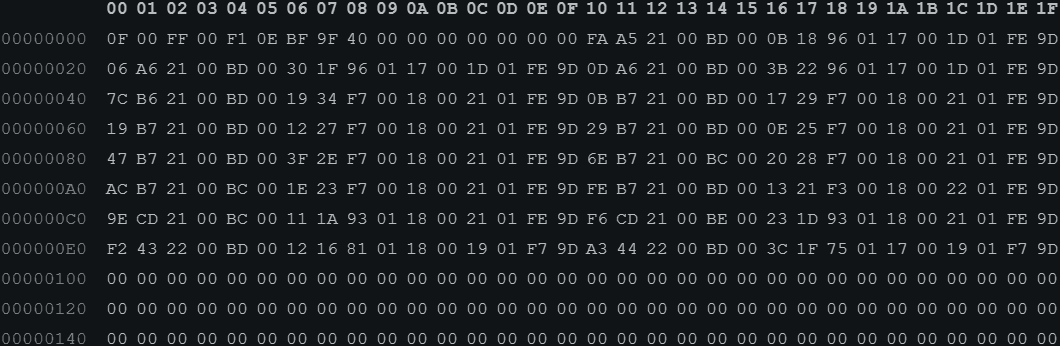
| Address | F | E | D | C | B | A | 9 | 8 | 7 | 6 | 5 | 4 | 3 | 2 | 1 | 0 |
|---|---|---|---|---|---|---|---|---|---|---|---|---|---|---|---|---|
| Header | Pad | Block size | Total Swap | Total RAM | Number of entries | Write index | ||||||||||
| 0x000 | Pad | 0x0040 64 pages 256kB | 0x9FBF 40895 blocks 10,469,120kB | 0x0EF1 3825 blocks 979,200kB |
0x00FF 255 | 0x000F 15 |
||||||||||
| Data entries | Free swap | Buffer RAM | Shared RAM | Free RAM | 5-minute load avg | 1-minute load avg | Process count | Uptime | ||||||||
| 0x010 | 0x9DFE 40446 blocks 10,354,176kB | 0x011D 285 blocks 72,960kB | 0x0017 23 blocks 4,352kB | 0x0E96 406 blocks 103,936kB |
0x18 24 9.6% | 0x0B 11 4.4% |
0x00BD 189 | 0x0021A5FA 2205178s 25.5 days |
||||||||
| 0x100 | 0x00000000000000000000000000000000 Empty, to be write |
|||||||||||||||
| 0xFF0 | 0x00000000000000000000000000000000 Last entry in the ring buffer, index = 255 |
|||||||||||||||
System Timer
I decided to use systemd-timer instead of cronjob because systemd-timer allows up to second-level frequency, whereas cronjob only allows minute-level frequency.
I created 3 timer jobs:
Short Period Real-time Record
This job records the real-time system information. It helps discover a real-time load spike.
For example, I can use this job to monitor the load while stress testing the server. Any system load increase reflects immediately (in fact, in the next sampling point, that is in the next few seconds).
My first trial is to record every second, for 255 entries in the record file, which gives around 4 minutes of real-time system information. However, the numbers returned by sysinfo() seem not changed between some records. Maybe the underlying implementation refreshes at a frequency lower than 1Hz. Therefore, I decided to slow down the sampling rate to 2Hz.
The following timer and service files are used to define this job:
// sysinfo_log_2s.timer
[Unit]
Description=Record sysinfo every 2 seconds
StartLimitBurst=3
StartLimitIntervalSec=1
[Timer]
OnBootSec=2s
OnUnitActiveSec=2s
AccuracySec=1s
[Install]
WantedBy=timers.target

// sysinfo_log_2s.service
[Unit]
Description=Record sysinfo every 2 seconds
StartLimitBurst=3
StartLimitIntervalSec=1
[Service]
ExecStart=/path/to/executable/sysinfo_log4k.elf /path/to/recordfile/sysinfo_log_2s.bin
Day-length Record
This job records the system information over a 24-hour period. It helps discover the trend over a day, for example, day time vs nigh time.
This job will record every 6 minutes, for 255 entries in the record file, which gives 25.5 hours of system information.
The following timer and service files are used to define this job:
// sysinfo_log_6m.timer
[Unit]
Description=Record sysinfo every 6 minutes
StartLimitBurst=3
StartLimitIntervalSec=1
[Timer]
OnBootSec=2s
OnUnitActiveSec=6m
AccuracySec=1m
[Install]
WantedBy=timers.target

// sysinfo_log_6m.service
[Unit]
Description=Record sysinfo every 6 minutes
StartLimitBurst=3
StartLimitIntervalSec=1
[Service]
ExecStart=/path/to/executable/sysinfo_log4k.elf /path/to/recordfile/sysinfo_log_6m.bin
Month-length Record
This job records the system information over a 1-month period. It helps discover the long-term trend.
This job will record every 10 minutes, for 4095 entries in the record file, which gives 28.4 days of system information.
The following timer and service files are used to define this job:
// sysinfo_log_6m.timer
[Unit]
Description=Record sysinfo every 10 minutes
StartLimitBurst=3
StartLimitIntervalSec=1
[Timer]
OnBootSec=2s
OnUnitActiveSec=10m
AccuracySec=1m
[Install]
WantedBy=timers.target

// sysinfo_log_6m.service
[Unit]
Description=Record sysinfo every 10 minutes
StartLimitBurst=3
StartLimitIntervalSec=1
[Service]
ExecStart=/path/to/executable/sysinfo_log64k.elf /path/to/recordfile/sysinfo_log_10m.bin
Enable Systemd Timer
The following command is used to enable the timers:
systemctl enable --now sysinfo_log_2s.timer
systemctl enable --now sysinfo_log_6m.timer
systemctl enable --now sysinfo_log_10m.timer
To list all timers:
systemctl list-timers
NEXT                            LEFT LAST                               PASSED UNIT                           ACTIVATES
Tue 2026-10-27 18:50:24 UTC    799ms Tue 2026-10-27 18:50:22 UTC        1s ago sysinfo_log_2s.timer           sysinfo_log_2s.service
Tue 2026-10-27 18:52:30 UTC  2min 5s Tue 2026-10-27 18:46:30 UTC  3min 54s ago sysinfo_log_6m.timer           sysinfo_log_6m.service
Tue 2026-10-27 18:55:58 UTC     5min Tue 2026-10-27 18:45:58 UTC  4min 25s ago sysinfo_log_10m.timer          sysinfo_log_10m.service
Read (and Render) the Record
The record program executables and the record files are saved in a web inaccessible directory (for example: /home/myhome), but with mod xx4 (read-only for anyone). Soft symlinks are created in a web accessible directory (for example: /var/www/html). These symlinks link to the record files. Therefore, the web interface (run by user www-data) cannot read or modify the record program executables and the orginal record files; instead, only the copies of the record files is accessible. If the web interface doomed, it cannot harm the server by using our record program. (For example, replace the record program by a malicious program.)
The web server does not perform any data manipulation over the record file. Instead, the record file is send to client as a raw binary blob.
It is worth mentioning that, there should some kind of access control on the web server. For example, download is allowed to admin users only. The access control implementation at the web server is out of this article's scope. Furthermore, the web server should respect the file lock.
After the record file is downloaded to the client side, it can be decoded and rendered using Javascript.

Helper Functions
const _ = (s, p = document) => p.querySelector(s);
const __ = (s, p = document) => p.querySelectorAll(s);
const dom = j => {
	if (typeof j == 'string') {
		const x = (new DOMParser()).parseFromString(j, 'text/html').body;
		if (_('parsererror', x))
			throw new Error(_('parsererror', x).textContent);
		if (_('sourcetext', x))
			throw new Error(_('sourcetext', x).textContent);
		return x;
	} else {
		let tag = 'div', children = [];
		if ('_' in j) { tag = j._; delete j._; }
		if ('children' in j) { children = j.children; delete j.children; }
		const x =  Object.assign(document.createElement(tag), j);
		children.map(y => {if (y) x.appendChild(dom(y))});
		return x;
	}
};

const svg_new = (width, height) => {
	const svg = document.createElementNS('http://www.w3.org/2000/svg', 'svg');
	svg.setAttribute('preserveAspectRatio', 'none');
	svg.setAttribute('viewBox', '0 0 '+width+ ' '+height);
	return svg;
};
const poly_new = (type, points, color='transparent', fill='transparent') => {
	const poly = document.createElementNS('http://www.w3.org/2000/svg', type);
	poly.setAttribute('points', points);
	poly.setAttribute('stroke', color);
	poly.setAttribute('fill', fill);
	return poly;
};

class MaxMin {
	constructor(min, max) {
		this.min = min;
		this.max = max;
	}
	add(value) {
		this.min = value < this.min ? value : this.min;
		this.max = value > this.max ? value : this.max;
	}
}

const uptimeHuman = second => {
	const day = Math.floor(second / 3600 / 24);
	second -= day * 3600 * 24;
	const hour = Math.floor(second / 3600);
	second -= hour * 3600;
	const minute = Math.floor(second / 60);
	second -= minute * 60;
	return [day+'d'+hour+'h'+minute+'m'+second+'s', day, hour, minute, second];
};
Helper functions:
-
_()and__()- Query selector. -
dom()- Create DOM tree. -
svg_new()andpoly_new()- Create SVG and SVG polygon / polyline. -
MaxMin- Record the min and max of a set of numbers. -
uptimeHuman()- Convert seconds to human-readable day-hour-minute-second format.
DOM
// HTML
<div id="waveform_text"><div id="waveform_text_overview"></div><div id="waveform_text_pointer"></div></div>
<svg id="waveform" viewBox="0 0 100 100" preserveAspectRatio="none" stroke-width="0.15"></svg>
<style>#waveform_text { position: absolute; padding: 0 1ch; background: rgba(255,255,255,0.25); } #waveform_text:hover { background: rgba(255,255,255,0.85); } #waveform { width: 100%; height: 400px; fill: transparent; } #waveform>* { width: 100%; height: 100%; }</style>

// JS
let sysinfo_data = [];
let sysinfo_pointer_svg = svg_new(2500, 100);
Create HTML elements:
-
div #waveform_text- Print the system information. The first child is used to print the trend information, the second child is used to print the interactive dashboard (information at selected time). -
#waveform- Draw the trend.
Create two global variables:
-
sysinfo_data- Buffer to store the decoded record file received from the server. -
#waveform- DOM to draw the interactive dashboard (a cursor).
Trend
Fetch the Record File
const sysinfo_log = async (filename) => { try {
	const file = new Uint16Array(( await (( await fetch('/sysinfo_log_' + filename + '.bin') ).bytes()) ).buffer);
Fetch the record file from the server. Since most information is saved using uint16_t in the record file, we will use Uint16Array to store them in Javascript.
Process the Header
	const data_blocksize = file[4] * 4096;
	const svg_width = file[1] - 1;
	const header = {
		data_wp:	file[0],
		data_total:	file[1],
		ram_total:	file[2] * data_blocksize,
		swap_total:	file[3] * data_blocksize
	};

	let path_cpu = '', maxmin_cpu = new MaxMin(100, 0);
	let path_cpu5 = '', maxmin_cpu5 = new MaxMin(100, 0);
	let path_ramFree = '', maxmin_ramFree = new MaxMin(header.ram_total, 0);
	let path_ramShared = '', maxmin_ramShared = new MaxMin(header.ram_total, 0);
	let path_ramBuffer = '', maxmin_ramBuffer = new MaxMin(header.ram_total, 0);
	let path_swapFree = '', maxmin_swapFree = new MaxMin(header.swap_total, 0);
	let maxmin_ramUsed = new MaxMin(header.ram_total, 0);
	let maxmin_swapUsed = new MaxMin(header.swap_total, 0);
Extract the header information:
-
data_wp- Write index of the ring buffer. -
data_total- Total number of data entries in the ring buffer. -
ram_total- Total RAM size, convert it from block size to byte size. -
swap_total- Total swap size, convert it from block size to byte size. -
data_blocksize- RAM and swap block size, convert it from page size to byte size.
Storage size is no longer a concern. Use raw size at client-side.
Process the Data Entries
	sysinfo_data = [];
	for (let i = 0; i < header.block_total; i++) {
		let ptr = (i + header.block_wp) % header.block_total;
		const ram_free = file[8 + 8 * ptr + 4] * data_blocksize;
		const ram_shared = file[8 + 8 * ptr + 5] * data_blocksize;
		const ram_buffer = file[8 + 8 * ptr + 6] * data_blocksize;
		const swap_free = file[8 + 8 * ptr + 7] * data_blocksize;
		const d = {
			uptime:		(file[8 + 8 * ptr + 1] << 16) | file[8 + 8 * ptr + 0],
			process:	file[8 + 8 * ptr + 2],
			load:		(file[8 + 8 * ptr + 3] & 0xFF) / 2.5, // Server gives uint8_t[2], range 0 - 250
			load5:		(file[8 + 8 * ptr + 3] & 0xFF00) / (2.5 * 256),
			ram_free:	ram_free,
			ram_shared:	ram_shared,
			ram_buffer:	ram_buffer,
			swap_free:	swap_free,
			ram_used:	header.ram_total - ram_free - ram_shared - ram_buffer,
			swap_used:	header.swap_total - swap_free
		};
		sysinfo_data.push(d);

		//max_cpu = d.load > max_cpu ? d.load : max_cpu;
		maxmin_cpu.add(d.load);
		maxmin_cpu5.add(d.load5);
		maxmin_ramFree.add(d.ram_free);
		maxmin_ramShared.add(d.ram_shared);
		maxmin_ramBuffer.add(d.ram_buffer);
		maxmin_swapFree.add(d.swap_free);
		maxmin_ramUsed.add(d.ram_used);
		maxmin_swapUsed.add(d.swap_used);

		path_cpu += ' '+i+','+ (100-d.load);
		path_cpu5 += ' '+i+','+ (100-d.load5);
		path_ramFree += ' '+i+','+ (d.ram_free/data_blocksize); // Reduce svg size, don't use byte number (too large), use block size
		path_ramBuffer += ' '+i+','+ (d.ram_buffer/data_blocksize + d.ram_free/data_blocksize) ;
		path_ramShared += ' '+i+','+ (d.ram_shared/data_blocksize + d.ram_buffer/data_blocksize + d.ram_free/data_blocksize); // Stack display
		path_swapFree += ' '+i+','+ d.swap_free/data_blocksize;
	}
Reset the buffer sysinfo_data, we are going to refill it with the record file just downloaded.
Because we are using a ring buffer design, and the write index data_wp is pointed to the next to write entry, which is the oldest (or the dirty one if the lock failed), data_wp+0 will be the oldest data entry, data_wp+1 will be the second oldest data entry, data_wp-1 will be the most recent data entry.
Each data entry includes following information:
-
uptime- 32-bit, concat the lower and higherUint16Array. -
process- Process count. -
load- 1-minute load average, stored in the lower byte, convert it from 0 - 250 range to 0.0 - 100.0 range. Note, Javascript usesfloatby default. -
load5- 5-minute load average, stored in the higher byte, convert it from 0 - 250 range to 0.0 - 100.0 range. -
ram_free- Free RAM, convert it from block size to byte size. -
ram_shared- Shared RAM, convert it from block size to byte size. -
ram_buffer- Buffer RAM, convert it from block size to byte size. -
swap_free- Free swap, convert it from block size to byte size. -
ram_used- Used RAM, which is not saved in the record file, but can be calculated by using total RAM size and other RAM size. -
swap_used- Used swap, which is not saved in the record file, but can be calculated by using total swap size and free swap size.
For each information:
-
Use
MaxMinto track its minimum and maximum across the entire record file. -
Place a way point in the polygon / polyline path. To reduce the SVG size, use block size for RAM and swap, this limits the SVG height to 65k pixels (
UINT16_MAX); otherwise, the SVG height can be up to gigapixels.
Print Information
	const data_last = sysinfo_data[sysinfo_data.length-1];
	_('#waveform_text_overview').replaceChildren(
		dom({_: 'p', textContent: 'CPU: Current '+data_last.load+'% ('+maxmin_cpu.min+'% min '+maxmin_cpu.max+'% max) - Avg5 '+data_last.load5+'% ('+maxmin_cpu5.min+'% min '+maxmin_cpu5.max+'% max) - Process '+data_last.process, style: 'color: red'}),
		dom({_: 'p', textContent: 'RAM: Free '+data_last.ram_free/1024/1024+'MB ('+maxmin_ramFree.min/1024/1024+'MB min '+maxmin_ramFree.max/1024/1024+'MB max) - Buffer '+data_last.ram_buffer/1024/1024+'MB ('+maxmin_ramBuffer.min/1024/1024+'MB min '+maxmin_ramBuffer.max/1024/1024+'MB max) - Shared '+data_last.ram_shared/1024/1024+'MB ('+maxmin_ramShared.min/1024/1024+'MB min '+maxmin_ramShared.max/1024/1024+'MB max) - Used '+data_last.ram_used/1024/1024+'MB ('+maxmin_ramUsed.min/1024/1024+'MB min '+maxmin_ramUsed.max/1024/1024+'MB max)', style: 'color: darkgreen'}),
		dom({_: 'p', textContent: 'Swap: Free '+data_last.swap_free/1024/1024+'MB ('+maxmin_swapFree.min/1024/1024+'MB min '+maxmin_swapFree.max/1024/1024+'MB max) - Used '+data_last.swap_used/1024/1024+'MB ('+maxmin_swapUsed.min/1024/1024+'MB min '+maxmin_swapUsed.max/1024/1024+'MB max)', style: 'color: blue'}),
		dom({_: 'p', textContent: 'Uptime '+uptimeHuman(data_last.uptime)[0]+' - '+header.block_total+' samples'}),
	);
Print the current (most recent), minimum and maximum of the information.
Draw SVG
	const svg_cpu = svg_new(svg_width, 100);
	svg_cpu.appendChild(poly_new('polyline', path_cpu, 'rgb(255, 0, 0)'));
	svg_cpu.appendChild(poly_new('polyline', path_cpu5, 'rgb(127, 63, 63)'));

	const svg_ram = svg_new(svg_width, header.ram_total/data_blocksize);
	svg_ram.appendChild(poly_new('polygon', svg_width+',0 0,0 0,'+header.ram_total/data_blocksize+' '+svg_width+','+header.ram_total/data_blocksize, '#030', '#030'));
	svg_ram.appendChild(poly_new('polygon', svg_width+',0 0,0' + path_ramShared, 'transparent', 'darkgreen'));
	svg_ram.appendChild(poly_new('polygon', svg_width+',0 0,0' + path_ramBuffer, 'transparent', 'green'));
	svg_ram.appendChild(poly_new('polygon', svg_width+',0 0,0' + path_ramFree, 'transparent', 'lightgreen'));

	const svg_swap = svg_new(svg_width, header.swap_total/data_blocksize);
	svg_swap.appendChild(poly_new('polyline', path_swapFree, 'rgb(0, 0, 255)'));

	const svg_grid = svg_new(svg_width, 100);
	for (let i = 1; i < 10; i++) {
		const y = 10 * i;
		svg_grid.appendChild(poly_new('polyline', svg_width+','+y+' 0,'+y, i == 5 ? 'rgba(128,128,128,0.75)' : 'rgba(128,128,128,0.45)'));
	}

	sysinfo_pointer_svg = svg_new(svg_width, 100);

	_('#waveform').replaceChildren(svg_ram, svg_grid, svg_cpu, svg_swap, sysinfo_pointer_svg);
	_('#waveform').dispatchEvent(new Event('mousemove'));
} catch (e) { dialog_error(0, 'System info log failed: ' + e); throw e; } };
Use polyline to draw the CPU load (red) and swap usage (blue) trend.
Use polygon to draw the RAM usage (green) trend.
At the end, draw a grid (grey) to help reading the trend. Each grid is 10% high.
Since the SVG data changed, fire a event to the interactive dashboard to force it to refresh.
This task can be fired periodically using setInterval() to refresh the trend SVG.
Interactive Dashboard
_('#waveform').onmousemove = event => {
	const cursor = event.layerX ?? _('#waveform').dataset.cursor ?? 0;
	_('#waveform').dataset.cursor = cursor;
	const x = cursor / _('#waveform').getBoundingClientRect().width;

	const data_ptr = sysinfo_data[Math.floor(x * sysinfo_data.length)];
	_('#waveform_text_pointer').replaceChildren(
		dom({_: 'span', textContent: 'CPU: '+data_ptr.load+'% - ('+data_ptr.load5+'%) - Process '+data_ptr.process, style: 'color: red'}),
		dom({_: 'span', textContent: ' | RAM: Free '+data_ptr.ram_free/1024/1024+'MB - Buffer '+data_ptr.ram_buffer/1024/1024+'MB - Shared '+data_ptr.ram_shared/1024/1024+'MB - Used '+data_ptr.ram_used/1024/1024+'MB', style: 'color: darkgreen'}),
		dom({_: 'span', textContent: ' | Swap: Free '+data_ptr.swap_free/1024/1024+'MB - Used '+data_ptr.swap_used/1024/1024+'MB', style: 'color: blue'}),
		dom({_: 'span', textContent: ' | Uptime '+uptimeHuman(data_ptr.uptime)[0]+' ('+uptimeHuman(sysinfo_data[sysinfo_data.length-1].uptime-data_ptr.uptime)[0]+' ago)'}),
	);

	const svg_width = sysinfo_pointer_svg.viewBox.baseVal.width, svg_height = sysinfo_pointer_svg.viewBox.baseVal.height;
	const poly_x = x * svg_width, poly_y = svg_height;
	sysinfo_pointer_svg.replaceChildren(poly_new('polyline', poly_x+',0 '+poly_x+','+poly_y, '#FFF'));
};
When the cursor moves on the trend SVG, read the information from buffer sysinfo_data for that specific position (time), base on the location of the cursor.
Print that information and draw the cursor.