Multilingual Webpage
In this article, I will discuss a few ways I used to create multilingual webpages. I will also include my thoughts about the advantages and disadvantages of these ways.
Web dev, Multilingual, Accept-Language, Navigator.language, Alternative language, SEO, HTML, lang, hreflang, Custome HTML Element, HTML dataset
--by Captdam @ Feb 2, 2026Index
I speak two languages, Mandarin and English. When I write my blogs, I would like to write it in two languages as well.
Client-side Translator
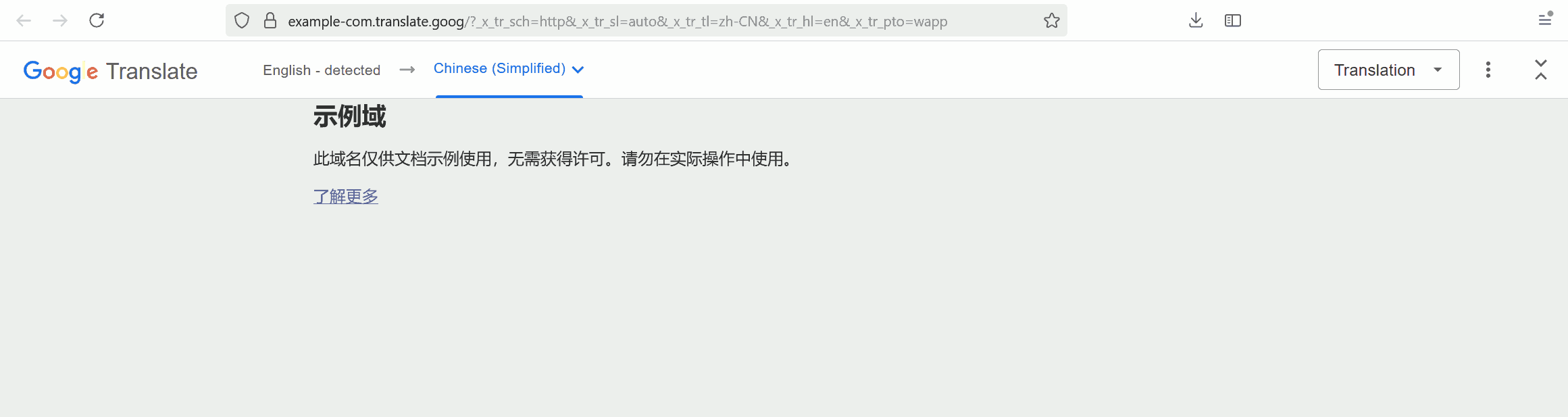
The easiest way is to embed a translator to translate the webpage, such as Google Translate. Following screenshot shows using Google Translate to translate a English page into Chinese:
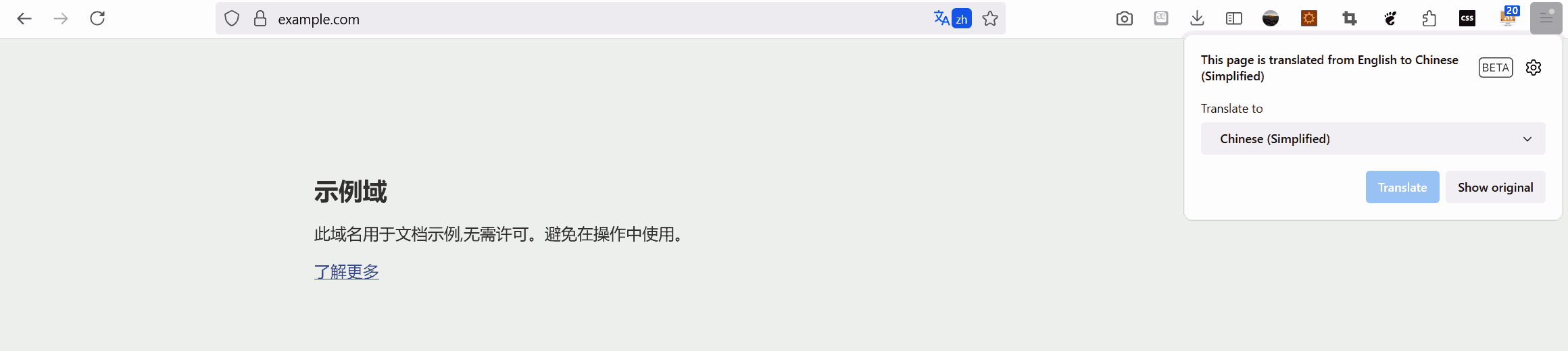
Furthermore, most modern browsers come with built-in translators. When the user is browsing a webpage other than the user’s preferred language setting in the browser, the browser will prompt the user to enable the translator. Following screenshot shows using Firebox's built-in translator to translate the same English page into Chinese:
Advantage
The advantage is that the web developer doesn't need to consider multilingualism, and the author only writes the article in his/her preferred language once.
Disadvantage
The translation is not perfect.
- It cannot translate slang correctly.
- It mistakenly translates symbols.
- It may not pick the right definition when dealing with professional terms.
- It cannot tolerate misspelled words.
For me, I would not let the translator translate the webpage for me, because my blogs contain too many professional terms. I will translate the article myself (although it is a good idea to use a translator to draft the article, then manually edit it). This not only ensures the translated version is accurate; but also allows me to review and correct mistakes in the original version.
Server-side Language Detection
In most cases, browsers will include the Accept-Language header in the HTTP request, which indicates the preferred language of the visitor. You can check this MDN article for more details.
Let's use Firefox as an example:
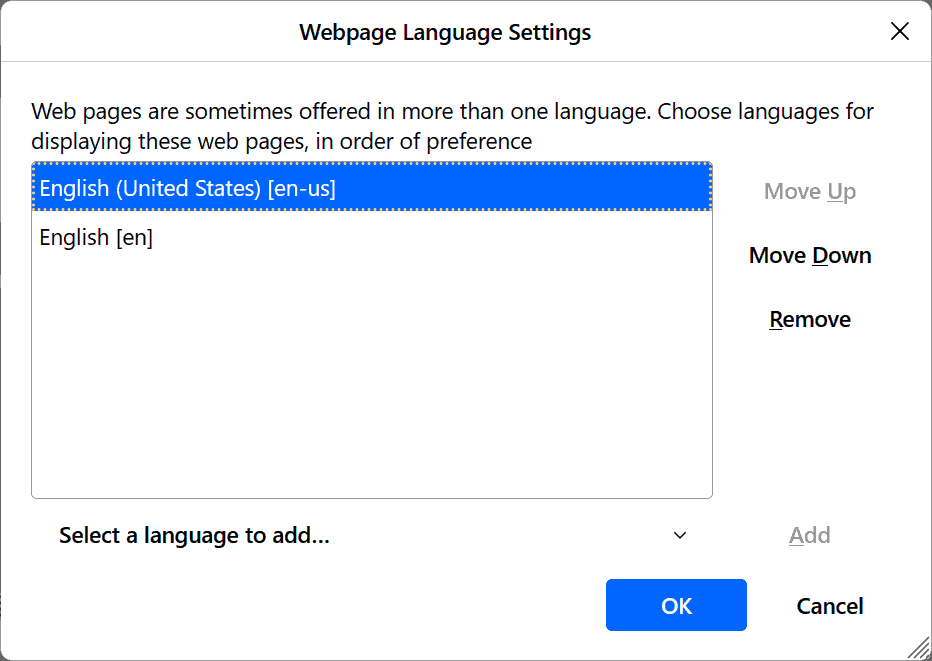
For example, my browser sends Accept-Language: en-US,en;q=0.5, which means I am expecting a webpage served in US English. If US English is not available, English is fine (So, British English or Australian English is OK, I can understand them although I don’t speak them and I am not familiar with their spelling and slang).
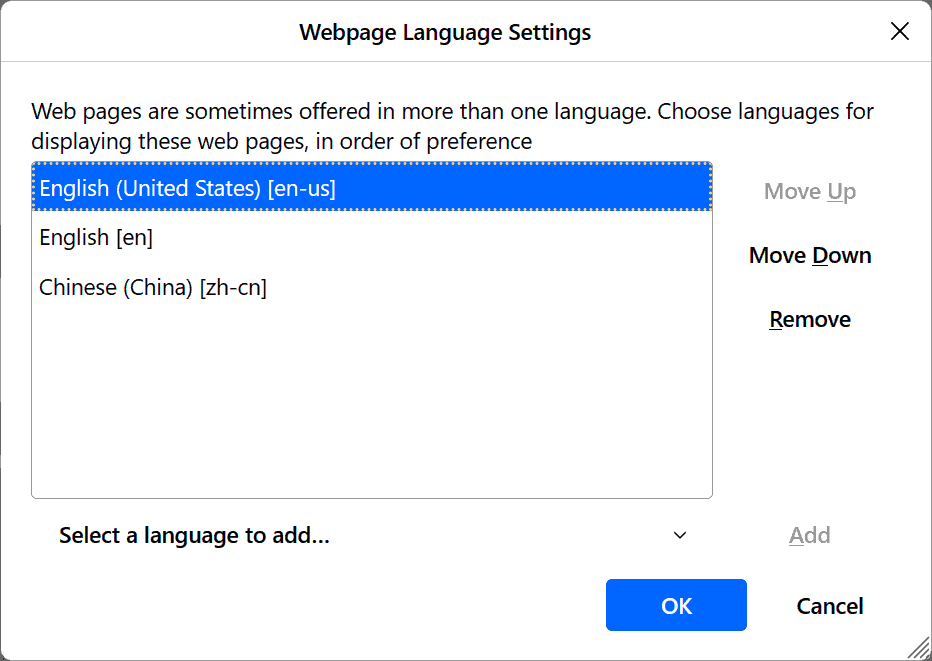
I can add Chinese as my second preferred language in my browser setting. After doing so, my browser will send Accept-Language: en-US,en;q=0.7,zh-CN;q=0.3, which means I would prefer US English first, then general English, then Chinese.
On the server side, the server should provide the most preferred available language to the client. If the server doesn’t have the content available in any of the accepted languages, the server can choose one language (for me, I will let the server to choose the original language I used to create the article) to serve the webpage. Then, let the visitor translate the article on the client-side.
For example, I will manually create and carefully review my article in both English and Chinese. Visitors using English and Chinese can read one of the versions I crafted, and what they read will be accurate. For visitors using other languages, such as French and Japanese, their preferred language is not available on the server; therefore, they will get the webpage in English or Chinese. They can rely on a translator to read the webpage. Nowadays, the browser can translate the webpage to their preferred language seamlessly; although not perfectly accurate, that’s the best result we can get in that case.
Note that the Accept-Language header is not always presented. In the HTTP specification, the Accept-Language is not mandatory. Therefore, do expect requests missing this header. In this case, the server may guess the preferred language.
Advantage
Server-side Language detection can be used to provide the most appropriate language of the webpage to the visitor. It picks the preferred language in a list of created and reviewed webpages to ensure the accuracy of the served webpage. If the requested language is not available, it falls back to the client-side translator.
Disadvantage
The most obvious disadvantage is the inconsistency. Using different browsers may send different Accept-Language headers, resulting in confusion. For examples:
- Alice (who speaks English only) sends a link to Bob (who speaks both Chinese and English). The server served the webpage in English to Alice but in Chinese to Bob; however, Alice expects Bob to see the exact same content (and in the same language) as her.
- Bob had read half of the webpage on his personal computer (which accepts Chinese). He needs to go to school for afternoon classes and he decided to finish reading the remaining half on the article on school library computer (which accepts English). He cannot find where he left earlier because the server provided the webpage in a different language.
In my opinion, visitors should be able to select the language they want, such as using a button to switch languages; instead of forcing them to use a language that the server believes is appropriate. Although the server determines the language based on the Accept-Language header provided by the user agent (browser), most people don't even know there is a language setting in their browser.
Using a Langing Page
The server-side language detection can be used to implement a landing page.
For example, when the visitor navigates to a webpage with URL link/to/this/article, the server will determine the visitor’s preferred language using the Accept-Language header, then redirect the visitor to link/to/this/article/en or link/to/this/article/zh which contains the article in English and Chinese.
As the URL suggested, the webpage link/to/this/article/en contains this article in English, and the webpage link/to/this/article/zh contains the article in Chinese. There should be server-side language detection should existed on link/to/this/article only, not on link/to/this/article/en or link/to/this/article/zh. Therefore, when the visitor shares the link, or when they switch browsers, they will always see the same webpage.
Client-side Language Selection - HTML Dataset
Imagine we have the original and translated articles, how do we put them together? One way is to write the HTML webpage in the original language, then add the multilingual versions in HTML dataset. Following example shows an English webpage with Chinese translation:
<span class="example_htmldataset" data-lang-en="Hello world" data-lang-zh="你好世界">Hello world</span>
By default, only the original language (English in this example) version will be presented to the visitor when the webpage is loaded.
Buttons can be provided to allow the visitor to change the language by replacing the text content by the dataset, shown below:
function example_htmldataset(lang) {
	document.querySelectorAll('.example_htmldataset').forEach(element => {
		element.textContent = element.dataset['lang'+lang];
	});
}
example_htmldataset('Zh');
See live example below:
You may opt to determine the preferred language using user agent information at page load to serve the visitor the most appropriate language. Similar to the Accept-Language HTTP header that can be read at the server-side, the client-side JavaScript can use the navigator.language or navigator.languages properties to get user language.
Advantage
Client-side language selection allows the visitor to select the preferred language of the website if that language is available.
Disadvantage
Client-side language selection requires not only the preferred language to be downloaded, but also all other options available need to be downloaded as well. That's negative for bandwidth and page load speed.
A search engine may only index the default language, because it can only see the text content (the default language). HTML dataset is designed to store custom data. For crawlers, other langauge versions saved in the dataset are arbitrary data and will be ignored. Furthermore, this method requires JavaScript interaction. Not all crawlers can execute JavaScript, so, don’t expect them to correctly understand your JavaScript.
Client-side Language Selection - Custom HTML Elements
Similar to using dataset to store the translated versions of the article, we can use custom HTML elements to store the different language versions of the article. For example, we can use:
<span class="example_htmlelements">
	<lang-zh>你好世界</lang-zh>
	<lang-en>Hello world</lang-en>
</span>
Remember to register these custom HTML elements so the browser can understand it.
(() => {
	class LangZhElement extends HTMLElement { constructor() { super(); } }
	class LangEnElement extends HTMLElement { constructor() { super(); } }
	customElements.define('lang-zh', LangZhElement);
	customElements.define('lang-en', LangEnElement);
})();
To display the article in one language, use CSS to hide all languages except the desired one, shown below: (Note we must use two <style> elements, the first to hide all, the second to display desired one)
<style>
	.example_htmlelements lang-en,.example_htmlelements lang-zh { display: none; }
</style>
<style>
	.example_htmlelements lang-en { display: inline; }
</style>
Buttons can be provided to allow the visitor to change the language by changing the CSS display rule on these elements in the second <style> element, shown below:
function example_htmlelements(lang) {
	document.querySelectorAll('#example_htmlelements style')[1].innerHTML = '.example_htmlelements lang-'+lang+' { display: inline; }'
}
example_htmlelements('zh');
See live example below:
Advantage
Client-side language selection allows the visitor to select the preferred language of the website if that language is available. (Same as HTML dataset)
Disadvantage
Client-side language selection requires not only the preferred language to be downloaded, but also all other options available need to be downloaded as well. That's negative for bandwidth and page load speed. (Same as HTML dataset)
Don’t expect the crawlers to understand the custom HTML elements. They may discard your content because they cannot understand these custom HTML elements, resulting in a blank page. They may index all contents in different languages in a plain way because the custom elements are treated as <span>, resulting in a page with mixed content.
One Language, One URL
This would be my preferred way after trying all previous solutions.
In this solution, we will create one webpage for each language we use to craft the article.
For the Chinese version, we will create a webpage with URL earth/zh, content as below:
<html><head>
	<title>地球</title>
</head><body>
	<p>地球是个球。</p>
	<a href="/earth/en">see English</a>
</body></html>
For the English version, we will create a webpage with URL earth/en, content as below:
<html><head>
	<title>Earth</title>
</head><body>
	<p>Earth is not flat.</p>
	<a href="/earth/zh">切换中文</a>
</body></html>
When the visitor lands on one of the multilingual webpages, they will be able to see this article in a specific language. If the visitor wants to read the article in another language and that language is available, the visitor can click that link, which will bring the visitor to a new webpage with specified language.
Live example? This article is an live example! See the "EN" and "中" buttons on top of this page.
Search Engine Optimization
For this solution, the search engine can index the pages for users who read different languages. For example, when an English user searches "earth", the search engine will provide "earth/en" in the result. On the other hand, when a Chinese user searches "地球", the search engine will provide "earth/zh" in the result.
At this moment, the search engine will consider the two webpages two individual and unrelated pages. To help the search engine understand the relationship between our multilingual webpages, we will add:
<html lang="zh"><head>
	<title>地球</title>
	<link rel="alternate" hreflang="en" href="/earth/en" type="text/html" />
	<link rel="alternate" hreflang=”zh" href="/earth/zh" type="text/html" />
</head><body>
	<p>地球是个球。</p>
	<a hreflang="en" href="/earth/en">see English</a>
</body></html>
<html lang="en"><head>
	<title>Earth</title>
	<link rel="alternate" hreflang="en" href="/earth/en" type="text/html" />
	<link rel="alternate" hreflang=”zh" href="/earth/zh" type="text/html" />
</head><body>
	<p>Earth is not flat.</p>
	<a hreflang="zh" href="/earth/zh">切换中文</a>
</body></html>
- The
lang="en"property in the<html>element tells the search engine the language of this webpage. - The
<link rel="alternate" hreflang="en" href="/earth/en" type="text/html" />metadata tell the search engine the other language versions of this multilingual webpage. - The
hreflang="zh"property in the<a>links tells the search engine the language of the linked URLs.
Advantage
This solution is simple and efficient.
This solution divides the multilingual versions of the article into different webpages, indexed using different URLs. At the page-level, it removes the idea of “multilingual”; instead, it relies on <link rel="alternate" hreflang="en" href="/earth/en" type="text/html" /> metadata and <a> links to build external multilingual relationships between URLs. This simplifies the website design.
This solution uses no JavaScript nor custom HTML elements, making it search engine friendly.
This solution ensures consistency. There is no server-side language detection nor client-side language selection that can modify the text content of the webpage. When the user openes a URL, it is guaranteed that the content will be consistent because that URL can only contain the article in one language.
Disadvantage
The author will need to craft the article in different files for different languages. Some people (like me) don’t like to cross reference between multiple files. Just personal preference.