ESP-32 TCP Baremetal HTTP server
This article demonstrates how to use the low-level TCP/IP socket to build a HTTP server for static or fixed-length response and minimum HTTP response header on ESP-32 in ESP-IDF, without using the HTTP library. It also discusses how lwIP works for TCP/IP network socket send, shutdown and close.
ESP-32, ESP-IDF, TCP/IP, HTTP Server, lwIP, network socket, send, shutdown, close
--by Captdam @ Sep 9, 2026Index
In this project, I am going to use ESP-32 to build a simple HTTP server that serves static HTML webpages and fixed-length dynamic binary files (such as sensor reading). This project is developed in C language using the official ESP-IDF framework v6.0.2.
You need basic HTTP knowledge:
-
HTTP is based on TCP/IP.
-
HTTP is text-based.
-
HTTP is composed from several lines of HTTP headers, an empty line and payload.
You need basic TCP knowledge:
-
TCP is connection oriented.
-
TCP has states, including:
LISTEN,ESTABLISHED,FIN-WAIT,CLOSED. -
TCP header contains numbers to track states, retransmission, congestion control, such as
ACK,SEQ,WIN; and flags, such asACK,RST,FIN.
We will start from a naive prototype, complete and optimize it, and discuss in detail using the lwIP source code as reference.
High Level ESP-IDF HTTP/HTTPS Library vs Low Level TCP/IP Library
The High Level ESP-IDF HTTP/HTTPS Library
The framework (ESP-IDF) comes with libraries for HTTP and HTTPS server; however, I don't like how the HTTP library works.
In ESP-IDF, I will need to register handlers to the library:
httpd_register_uri_handler(server, &handler);
where the handler includes the URL and how to respond to the request:
static const httpd_uri_t ctrl = {
	.uri		= "/index.html",
	.method		= HTTP_GET,
	.handler	= respond_function,
	.user_ctx	= NULL
};
static esp_err_t respond_function(httpd_req_t *req) {
	httpd_resp_set_type(req, "text/html");
	httpd_resp_set_hdr(req, "Cache-Control", "no-cache");
	httpd_resp_send_chunk(req, payload, len);
	httpd_resp_send(req, payload, strlen(payload));
	return ESP_OK;
}
That means, the library is maintaining a list (at some cost) of serveable URLs. I am assuming that the library author is trying to simulate a real HTTP server (which I mean something like Linux Apache server) that looks for a real file on the disk, where the list is a file directory.
The Low Level TCP/IP Library
Furthermore:
-
I only need the simplest HTTP functionalities:
-
GET
-
-
and the minimum header support:
-
HTTP/1.0 200 OKorHTTP/1.0 404 Not Found -
Content-Length: sizeof(payload) -
Content-Type: text/html; charset=utf-8orContent-Type: application/octet-stream
-
-
TLS is not required:
-
This device only works on an internal network.
-
The encryption and description adds more system load.
-
As we all know, HTTP is a text-based communication protocol built on top of TCP/IP. It is very simple to build a simple HTTP request or response. All we need is a text-based header, an empty line, followed by HTML or binary payload. Therefore, it does not make any sense to use the heavy HTTP or HTTPS library if I can rely on the light TCP/IP (socket) library with few lines of code.
Following examples show two HTTP responses, one in HTML webpage and in the other one in binary file:
HTTP/1.0 200 OK
Content-Type: text/html; charset=utf-8
Content-Length: 82

<!DOCTYPE html><html><head><title>123</title></head><body><p>456</p></body></html>
HTTP/1.0 200 OK
Content-Type: application/octet-stream
Content-Length: 8

ABCDEFGH
and to send them, we can use:
const char html_index[] = "<!DOCTYPE html><html><head><title>123</title></head><body><p>456</p></body></html>";
char tcp_buffer[4096];

int sock = accept(tcp_sock, NULL, NULL);
size_t wp = sprintf(tcp_buffer, "HTTP/1.0 200 OK\r\nContent-Type: text/html; charset=utf-8\r\nContent-Length: %d\r\n\r\n%s", sizeof(html_index), html_index);
send(sock, tcp_buffer, wp, 0);
close(sock);
const char file_bin[8] = {'A', 'B', 'C', 'D', 'E', 'F', 'G', 'H'};
char tcp_buffer[4096];

int sock = accept(tcp_sock, NULL, NULL);
size_t wp = sprintf(tcp_buffer, "HTTP/1.0 200 OK\r\nContent-Type:Content-Type: application/octet-stream\r\nContent-Length: %d\r\n\r\n%s", sizeof(file_bin), file_bin);
memcpy(tcp_buffer + wp, file_bin, sizeof(file_bin));
send(sock, tcp_buffer, wp + sizeof(file_bin), 0);
close(sock);
The above code is to illustrate how to send data through socket but should not be used for production environments. The sprintf(dest, "format string %s", str) function family is very low efficient when coping strings; it not only needs to parse the format string, but also needs to copy the string from source to destination while looking for the zero terminator.
I am using sizeof() instead of strlen() because sizeof() can be used on string[] (including binary string) and the size is resolved at compile time. A smart compiler may even replace sprintf(dest, "format string %d", sizeof(...)) into memcpy(dest, "format string 1234", 19) because all required information is available at compile time.
However, the sizeof() returns the size of the variable instead of the actual data length. It will not work for pointer. It will give larger size than the actual data length if the buffer size is larger than the actual data. For a constant string const char index_html[] = "Something...", sizeof(index_html) will be the actual data length + 1 (for the null terminator).
Host TCP/IP Server on ESP32 Using ESP-IDF
Start the TCP/IP Server
To start the server, run the following code in the app_main() function:
struct sockaddr_storage dest_addr;
struct sockaddr_in *dest_addr_ip4 = (struct sockaddr_in *)&dest_addr;
dest_addr_ip4->sin_addr.s_addr = htonl(INADDR_ANY);
dest_addr_ip4->sin_family = AF_INET;
dest_addr_ip4->sin_port = htons(80);

tcp_sock = socket(AF_INET, SOCK_STREAM, IPPROTO_IP);
if (tcp_sock < 0) {
	ESP_LOGE("[TCP]", "Unable to create socket: errno %d", errno);
	return;
}
int opt = 1;
setsockopt(tcp_sock, SOL_SOCKET, SO_REUSEADDR, &opt, sizeof(opt));

ESP_LOGI("[TCP]", "Socket created fd=%d", tcp_sock);

int err = bind(tcp_sock, (struct sockaddr *)&dest_addr, sizeof(dest_addr));
if (err != 0) {
	ESP_LOGE("[TCP]", "Socket unable to bind: errno %d", errno);
	ESP_LOGE("[TCP]", "IPPROTO: %d", AF_INET);
	close(tcp_sock);
	return;
}
ESP_LOGI("[TCP]", "Socket bound");

err = listen(tcp_sock, 1);
if (err != 0) {
	ESP_LOGE("[TCP]", "Error occurred during listen: errno %d", errno);
	close(tcp_sock);
	return;
}

xTaskCreate(tcp_main, "TCP", 4096, NULL, 5, NULL);
ESP_LOGI("[TCP]", "Socket ready");
The above code in the app_main() function will be executed after the chip initialization and executed for only once. Once finished, the app_main() function returns, and frees the resources (RAM and flash cache) consumed by executing this function:
-
RAM includes the stack consumed by this function.
-
This function is executed from the flash memory, which is external to the CPU. While executing, the flash regions containing the code must be cached in a small internal RAM to allow the CPU to fetch the instructions. When this function is no longer used, the cache can be used for other on-flash data and code.
In the above code, we:
-
Start and bind a stream socket (TCP/IP) on port 80.
-
Begin to listen to any request on this port.
-
Create a RTOS task
tcp_main. This is similar to creating a thread in POSIX that is dedicated for TCP/IP communication.
Response TCP/IP Connections
Then, create a function tcp_main() which handles TCP/IP communication and a buffer char tcp_buffer[4096]:
DRAM_ATTR int tcp_sock;
DRAM_ATTR char tcp_buffer[4096];
IRAM_ATTR void tcp_main(void* param) { while (1) {
	int sock = accept(tcp_sock, NULL, NULL);
	// int recvlen = recv(sock, tcp_buffer, sizeof(tcp_buffer), 0); // Optionally read the request
	size_t wp = sprintf(tcp_buffer, "HTTP/1.0 200 OK\r\nContent-Type: text/html; charset=utf-8\r\nContent-Length: %d\r\n\r\n%s", sizeof(html_index), html_index);
	send(sock, tcp_buffer, wp, 0);
	close(sock);
} }
In this function, we:
-
Wait for a new request.
-
Read the request, which copies the data from kernel-space (socket buffer) to user-space (our
char tcp_buffer[]). -
Print the response into the user-space buffer.
-
Send the response by passing the data from user-space to kernel-space.
-
Close this connection.
-
Go back to step 1, waiting for a new request.
Note that the function tcp_main() and the buffer char tcp_buffer[] have attributes IRAM_ATTR and DRAM_ATTR, respectively. This ensures that they are loaded in RAM instead of flash or external SPI RAM to prevent any stall on cache miss. The function and the buffer are frequently used; hence, stall should be avoided.
This is a prototype for tcp_main() function. Do not use it in production environments.
To Send HTTP Response
HTTP Format
As the above example shows, to send a HTTP response, we will need to send the header first, followed by the payload.
Header
The first line of the header is always HTTP/1.0 200 OK, which means the server is able to provide the requested resource.
For text-based response (HTML), the second line is always Content-Type: text/html; charset=utf-8, which means the response body is an text HTML webpage using utf-8 encoding. For binary response, we can use Content-Type: application/octet-stream, which means the response body is a custom binary string.
The third line is tricky, it tells the length of the response body (HTML text or binary file). Since we are serving static HTML webpage and fixed-length binary blob, we can use sizeof(index_html) to get its size (in bytes).
The above 3 lines formed the minimum HTTP header.
HTML Body
Followed by the header and an empty line is our HTML payload.
Since it is a static HTML webpage, we can use constant string to store it.
Create a new file index.html, populate with the following example HTML code; then, include this file using #include "index.html":
#define MLSTR(...) #__VA_ARGS__
const char html_index[] = MLSTR(<!DOCTYPE html>
<html><head>
	<title>123</title>
</head><body>
	<p>456</p>
</body></html>);
#undef MLSTR
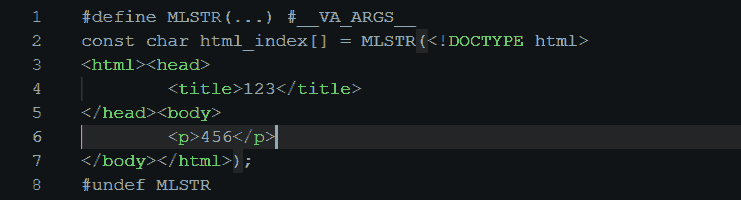
In this way, most IDEs can provide syntax highlighting for HTML, while the C compiler can process the HTML code as a string. Convenient during dev.
Send the HTTP Header and Payload in One Shot
We will build a complete HTTP response in a buffer first, then send that buffer. Assume the buffer is large enough to handle the header and the payload.
Wait for request from client:
int sock = accept(tcp_sock, NULL, NULL);
First, let's populate the buffer with the HTTP header and the HTML payload.
Use sprintf() function to write the header into the buffer:
size_t wp = sprintf(tcp_buffer, "HTTP/1.0 200 OK\r\nContent-Type: text/html; charset=utf-8\r\nContent-Length: %d\r\n\r\n", sizeof(html_index));
HTTP uses \r\n for new lines.
To append the HTML payload after the header in the buffer, copy the HTML payload to the buffer offset by the number of bytes just wrote:
memcpy(tcp_buffer + wp, html_index, sizeof(html_index));
The memory copy memcpy(dest, src, len) is faster than string print sprintf(dest, "%s", src) for fixed-length data. In general, it can use multi-byte copy or DMA (while switch to another thread) and it can handle non-text data.
or, for binary data:
memcpy(tcp_buffer + wp, file_bin, sizeof(file_bin));
Now, send them:
send(sock, tcp_buffer, wp + sizeof(html_index), 0);
At the end, close the connection:
close(sock);
Use a browser on PC to request the webpage on ESP-32, everything looks OK:


Use Wireshark to inspect the TCP/IP transaction:

- PC starts TCP/IP connection.
- Server accepts TCP/IP connection by calling
int sock = accept(tcp_sock, NULL, NULL). - PC acks the connection.
- PC sends the HTTP request.
- Server sends the HTTP response.
- Server resets the TCP/IP connection by calling
close(sock). Everything looks fine so far.
Send the HTTP Header then Payload
Emmm, I don't like that I have to copy the HTML payload into the buffer. Can I directly pass the HTML payload to the send() function?
Yes!
But I still need to send the HTTP header first. Can I send the header followed by the payload in two separate calls?
Yes! TCP/IP is a stream protocol, it doesn't make any difference to send everything in one shot or in multiple calls. As long as all data is sent in order before the socket is closed by close().
Wait for request from client:
int sock = accept(tcp_sock, NULL, NULL);
Send the HTTP header:
size_t wp = sprintf(tcp_buffer, "HTTP/1.0 200 OK\r\nContent-Type: text/html; charset=utf-8\r\nContent-Length: %d\r\n\r\n", sizeof(html_index));
send(sock, tcp_buffer, wp, 0);
Then, send the HTML payload:
send(sock, html_index, sizeof(html_index), 0);
At the end, close the connection:
close(sock);
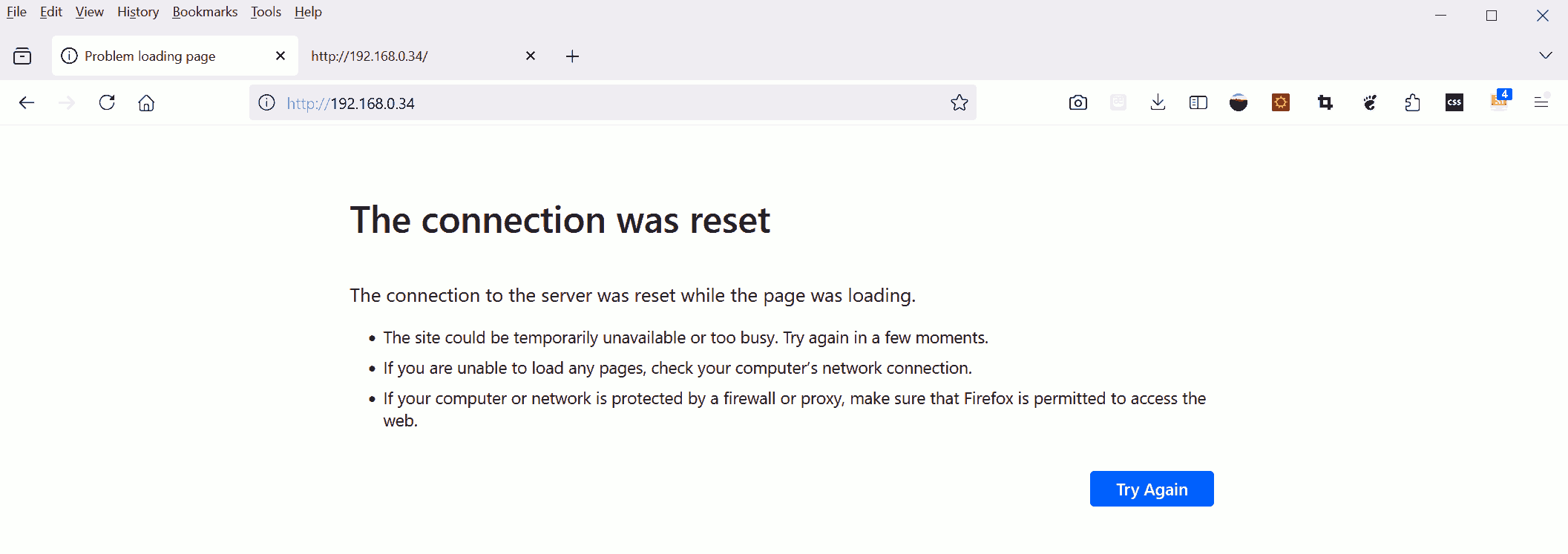
Use a browser on PC to request the webpage on ESP-32, something goes wrong:
Use Wireshark to inspect the TCP/IP transaction:

- PC starts TCP/IP connection.
- Server
accept()TCP/IP connection. - PC acks the connection.
- PC sends the HTTP request.
- Server sends the HTTP header. The HTML payload hasn't been
send()at this moment. - Server
close()the TCP/IP connection bofore the HTML payload sent. Only portion of the HTTP response arrived the client-side browser before the connection closed; hence, the browser says "connection was reset".
Connection Closed
The failure is due to the connection being closed (reset) by the server before the entire HTTP response sent.
The browser is expecting a whole HTTP response, that is, a header and a payload specified by the Content-Length header; but, it only receives a portion of the response. Therefore, the browser alerts us "Connection was reset".
If we go back to the previous example, where we send the HTTP header and payload in one shot, we can see that the connection is reset. But, we were lucky that the entire response did send before the connection closed.
Connection reset is abnormal. In that example, the server forces close (RST) the TCP/IP connection. Wireshark highlights frame 69 in red, and tells us something goes wrong. In normal circumstances, the connection should exist gracefully, using FIN.
Although the TCP/IP connection failed, in the first example, the browser received enough data to present the webpage at best effort; therefore, it did not say "Connection was reset". Where as in the second example, the browser has no way to present the received (portion) data but to tell us something goes wrong.
It is not clear why the first send() can be fulfilled but the second send() cannot, even the close() is called after the second send() is returned on the server-side.
Keep reading to figure it out, or click here for spoiler
Without shutdown(sock, SHUT_WR), close() will cause the TCP/IP thread to send a RST packet. At this time, data from the first send() is already on the wire, but data from the second send() is still in the TCP/IP queue. Therefore, close() makes a RST packet that overrides the second send().
For now, let's just assume that: To wait for all pending send() to finish, we must close the write side of the socket by calling shutdown(sock, SHUT_WR) before close(sock). We will discuss the detail later.
Now, putting everything together, our code becomes:
int sock = accept(tcp_sock, NULL, NULL);

// Send header then body
size_t wp = sprintf(tcp_buffer, "HTTP/1.0 200 OK\r\nContent-Type: text/html; charset=utf-8\r\nContent-Length: %d\r\n\r\n", sizeof(html_index));
send(sock, tcp_buffer, wp, 0);
send(sock, html_index, sizeof(html_index), 0);

// Combine and send
/*
size_t wp = sprintf(tcp_buffer, "HTTP/1.0 200 OK\r\nContent-Type: text/html; charset=utf-8\r\nContent-Length: %d\r\n\r\n", sizeof(html_index));
memcpy(tcp_buffer + wp, html_index, sizeof(html_index));
send(sock, tcp_buffer, wp + sizeof(html_index), 0);
*/

shutdown(sock, SHUT_WR);
close(sock);
Use Wireshark to inspect the TCP/IP transaction after we add shutdown(sock, SHUT_WR):

- PC starts TCP/IP connection.
- Server
accept()TCP/IP connection. - PC acks the connection.
- PC sends the HTTP request.
- Server sends the HTTP header.
- Server sends the HTTP payload. Now, the HTTP response is complete. Meanwhile, server tells PC the connection is
close(). - PC acks the HTTP response data.
- PC closes the connection.
- Server acks connection closed.
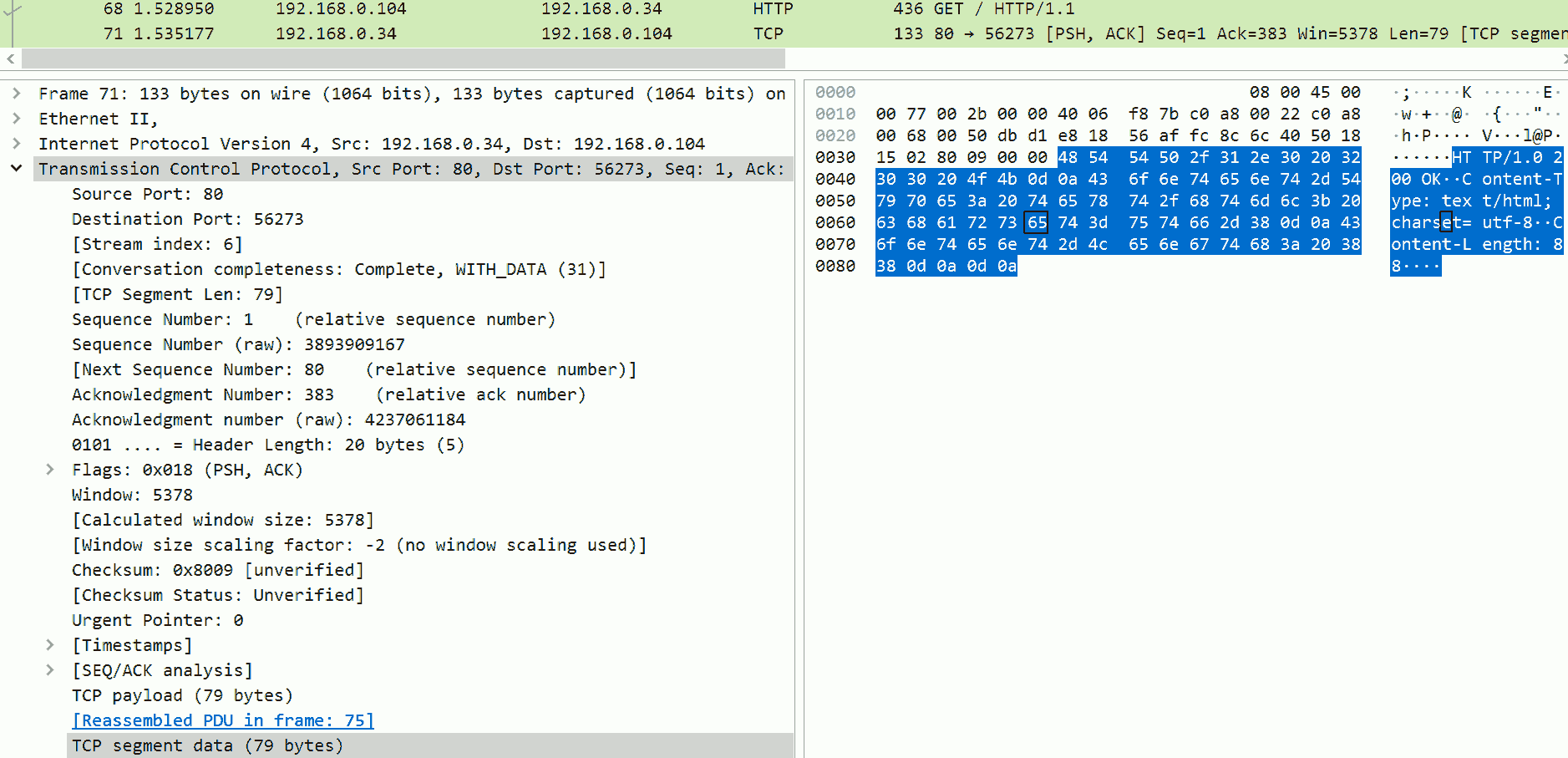
Here is the detail of frame 71, which is the first portion of the response.
As we can see, only the HTTP header is sent.
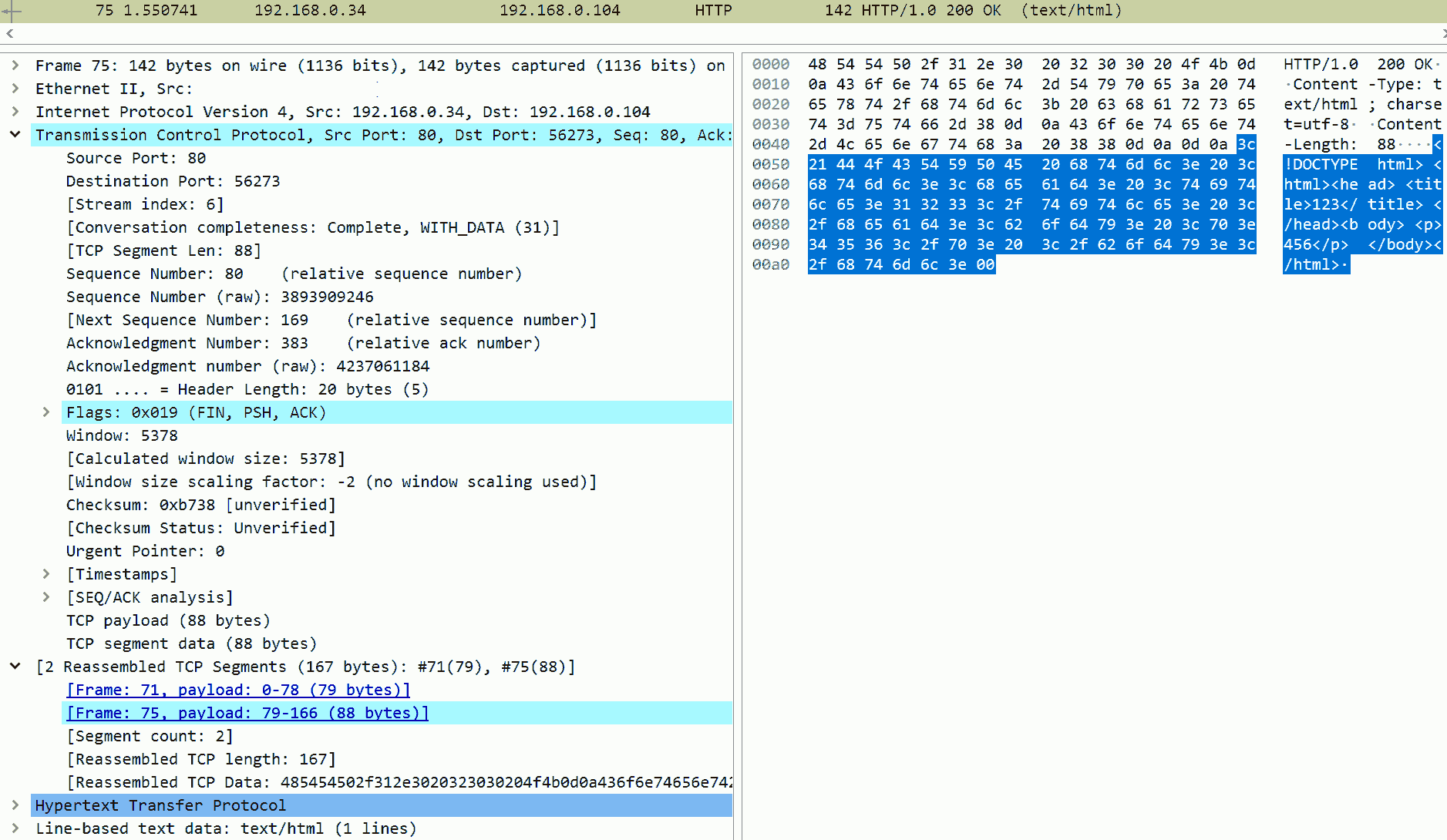
Here is the detail of frame 75, which is the second portion of the response.
As we can see, the HTML payload is sent. Note the Sequence Number in the TCP layer is 80, which means this data should be appended to previous packet.
Also note the FIN flag, which means to close() the connection.
The Speed Difference
At the first glance, using multiple send() calls may seem faster and convenient because we do not need to copy the HTML payload into the buffer. However, the send() function is a system-call, meaning the control is passed from user-space (our code to supply the response data) to kernel-space (to send it using hardware). When there is system-call, there are context switch, permission protection check, memory controller setting, housekeeping, all of them are not cheap.
To measure the speed difference, we will use a low-level profiling tool, that is, read the CPU cycle counter using cpu_hal_get_cycle_count() from hal/cpu_hal.h. By subtracting the cycle count at the end and beginning of the transaction, we can learn how fast the program is.
Add the profiling tool:
int sock = accept(tcp_sock, NULL, NULL);
uint32_t start = cpu_hal_get_cycle_count();

// Send header then body
size_t wp = sprintf(tcp_buffer, "HTTP/1.0 200 OK\r\nContent-Type: text/html; charset=utf-8\r\nContent-Length: %d\r\n\r\n", sizeof(html_index));
send(sock, tcp_buffer, wp, 0);
send(sock, html_index, sizeof(html_index), 0);

// Combine and send
/*
size_t wp = sprintf(tcp_buffer, "HTTP/1.0 200 OK\r\nContent-Type: text/html; charset=utf-8\r\nContent-Length: %d\r\n\r\n", sizeof(html_index));
memcpy(tcp_buffer + wp, html_index, sizeof(html_index));
send(sock, tcp_buffer, wp + sizeof(html_index), 0);
*/

uint32_t end1 = cpu_hal_get_cycle_count(); // After send()
shutdown(sock, SHUT_WR);
uint32_t end2 = cpu_hal_get_cycle_count(); // After shutdown()
close(sock);
uint32_t end3 = cpu_hal_get_cycle_count(); // After close()
ESP_LOGI("[TCP]", "Finished in %"PRIu32" / %"PRIu32" / %"PRIu32" cycles", end1 - start, end2 - start, end3 - start);
then, request the webpage for 10+ times in each case:
| Case | Avg | Min | Max |
|---|---|---|---|
Send header then body - After send() |
269389 | 240183 | 288083 |
Combine and send - After send() |
206019 | 199953 | 221597 |
| Imporove | 30.8% | 20.1% | 30.0% |
Send header then body - After shutdown() |
408135 | 369389 | 461831 |
Combine and send - After shutdown() |
375104 | 325218 | 408098 |
| Imporove | 8.8% | 13.6% | 13.2% |
Send header then body - After close() |
525985 | 477074 | 563292 |
Combine and send - After close() |
479778 | 440645 | 540287 |
| Imporove | 9.6% | 8.3% | 4.3% |
As we can see, even with some memory copying, combine the HTTP header and payload into one buffer then send is about 5-10% faster than using multiple send() system calls for header and payload. Every call is an expensive context switch.
Keep reading to figure it out, or click here for spoiler
In fact, because lwIP uses multi-thread:
- Requires semaphore.
- Thread unblocking is asynchronous. When the current thread blocks, the OS switches to another thread. Only when that thread pauses, OS can switches back to the current thread.
Furthermore, when reading the lwIP source code, we can a lot of parameter check, format conversion, state check, child function call. These consume more CPU cycles.
If instruction cache is low, when call lwIP or when return, it is possible that the program instruction cache has been replaced by other programs. In this case, the OS must reload the program from flash into RAM. This is a hard stall.
On the other hand, memcpy() doesn't consume a lot CPU cycles, no context switch required (everything is in user-space), and has an excellent cache cache locality.
However, when the payload gets larger, more memory must be allocated to the buffer.
Shall we prioritize the speed or the memory footprint, your call.
Large HTTP Response
In the previous example, we successfully sent a small HTML webpage to the client. It demonstrates how to use TCP/IP with few lines of code to build an HTTP server on ESP-32. However, in real situations, we are likely to need to send larger payloads. For example, a HTML file can be a few kilobytes to tens of kilobytes, and an image can range from a few hundred kilobytes to a few megabytes.
We have to discuss this matter in two cases, one for which the data is larger than the network MTU size, the other one for which the data is larger than the kernel network buffer size.
Larger than MTU/MSS Size
Although not 100% correctly, we will assume the MTU (maximum transmission unit at network layer) size to be 1500 bytes. The MMS (maximum segment size for TCP only) will be a few bytes smaller than MTU size due to TCP headers.
In this example, we will send a HTML webpage that is about 2k bytes:
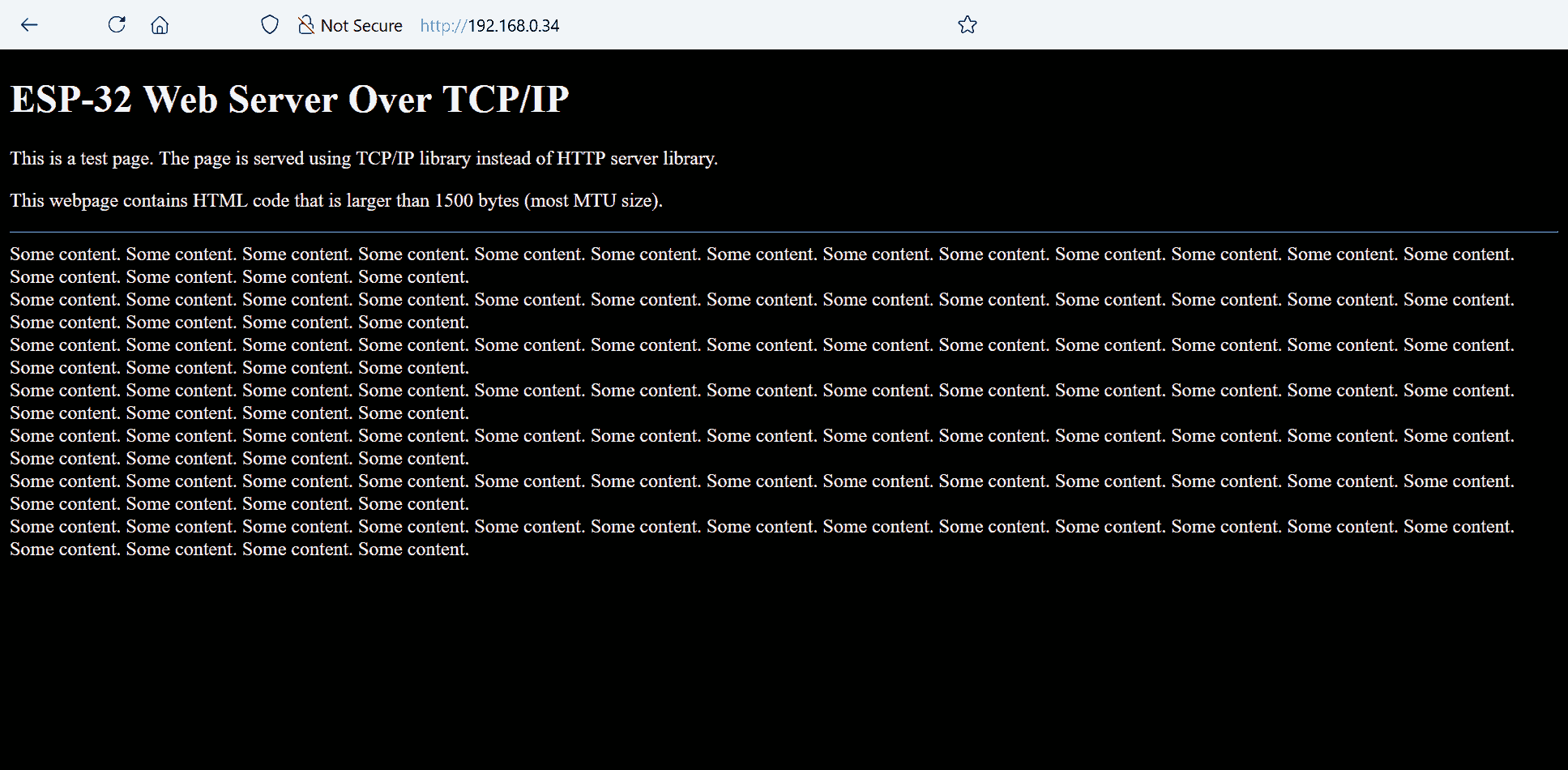
The ESP-32 is connected to my home WiFi router in 2.4GHz channel will be used as the server. At the same time, I will use a PC which is connected to the same WiFi router but in 5GHz channel to fetch this webpage.
Let's take a look at Wireshark's record on my PC:

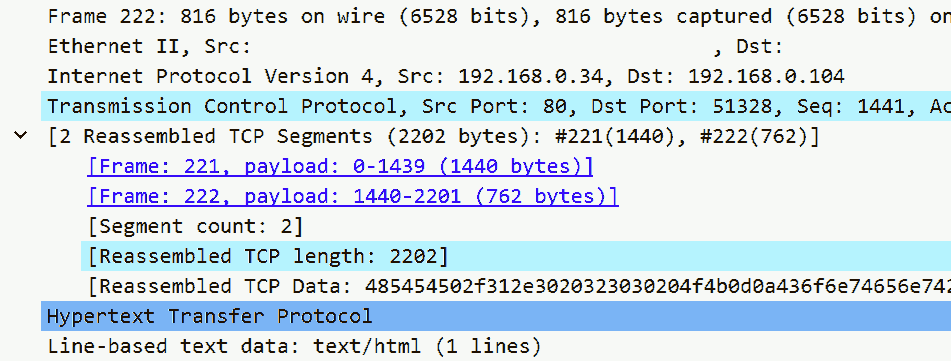
As we can see in the Wireshark's record:
- The client starts the connection. The MSS size of the client is 1440 bytes.
- The server accepts the connection. The MSS size of the server is 1440 bytes.
- The client sends the request.
- The first portion of the HTTP response (1440 bytes long payload).
- The second portion of the HTTP response (762 bytes long payload), together with the previous portion to form a complete HTTP response.
The complete HTTP response is 2202 bytes long, larger than the MSS size; hence transmitted in two separated frames.
Larger than Kernel Buffer Size
We already discussed that the send() call copies the data from user-space to kernel-space. As it is copied to kernel-space, there must be a memory (buffer) to temporarily hold the data in the kernel side while the underlying hardware placing the data on the wire bit by bit. Of course, that memory is not unlimited.
If we take a look on the Linux manual page, send(int sockfd, const void buf[size], size_t size, int flags) return the number of bytes sent. That means, it is possible that only a portion of supplied buf[] is sent because the kernel-side buffer is full. In this case, we should resend the remaining portion at a later time.
During the chip initialization, some logs are printed on serial port, one says:

That is, the OS allocated 5760 bytes to the send buffer. This number can be modified in menuconfig:
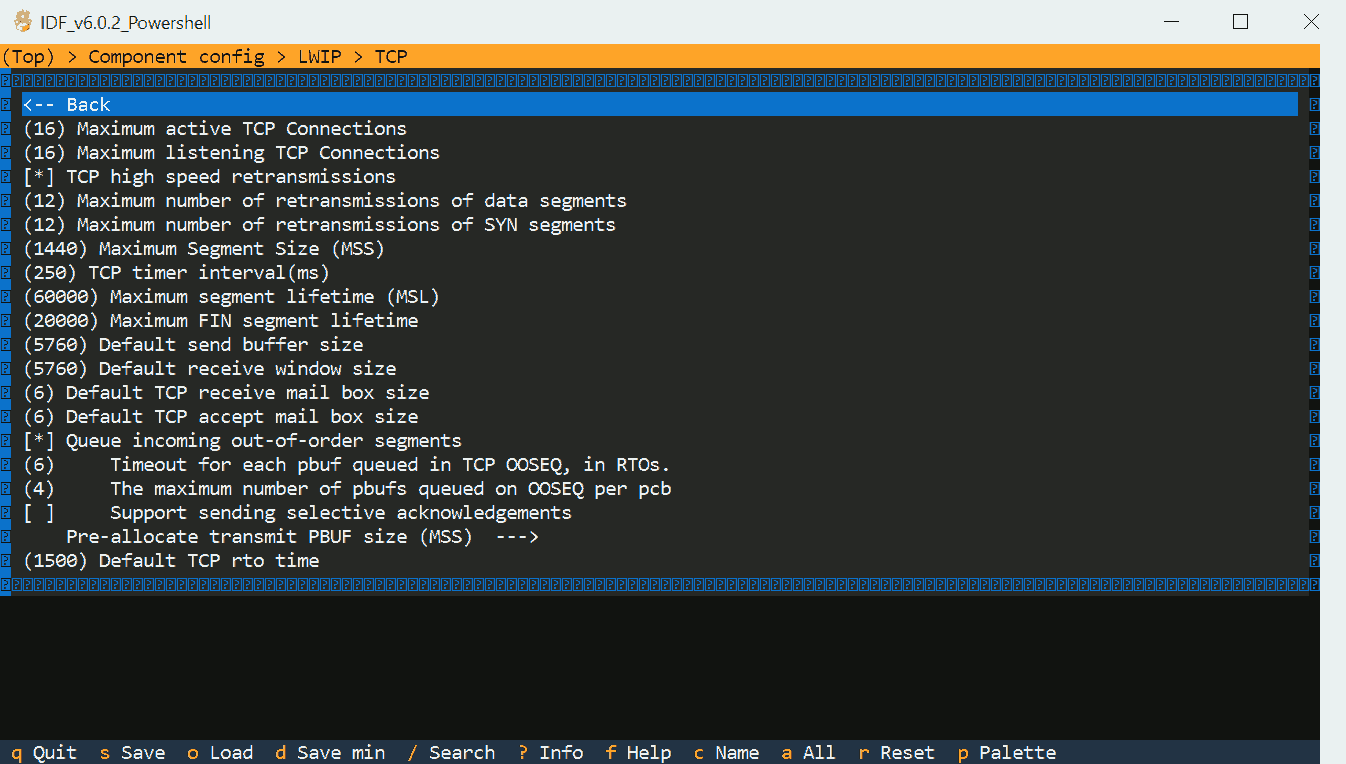
The send() call can only accept at most this much data; therefore, our software must resend the remaining data by calling this function again. To inspect how the send() call works when the supplied data is larger than the send buffer, we will print how much data is sent in the call, and how much data is remaining to be sent:
IRAM_ATTR void tcp_main(void* param) {
	while (1) {
		int sock = accept(tcp_sock, NULL, NULL);

		size_t wp = sprintf(tcp_buffer, "HTTP/1.0 200 OK\r\nContent-Type: text/html; charset=utf-8\r\nContent-Length: %d\r\n\r\n", sizeof(html_index));
		memcpy(tcp_buffer + wp, html_index, sizeof(html_index));
		size_t sent = 0, total = wp + sizeof(html_index);
		while (sent < total) {
			ESP_LOGI("[TCP]", "Sent combined %d of %d", (int)sent, (int)total);
			size_t just = send(sock, tcp_buffer + sent, total - sent, 0);
			ESP_LOGI("[TCP]", "Just %d of %d", (int)just, (int)total);
			sent += just;
		}

		shutdown(sock, SHUT_WR);
		close(sock);
	}
}
Fetch this webpage:
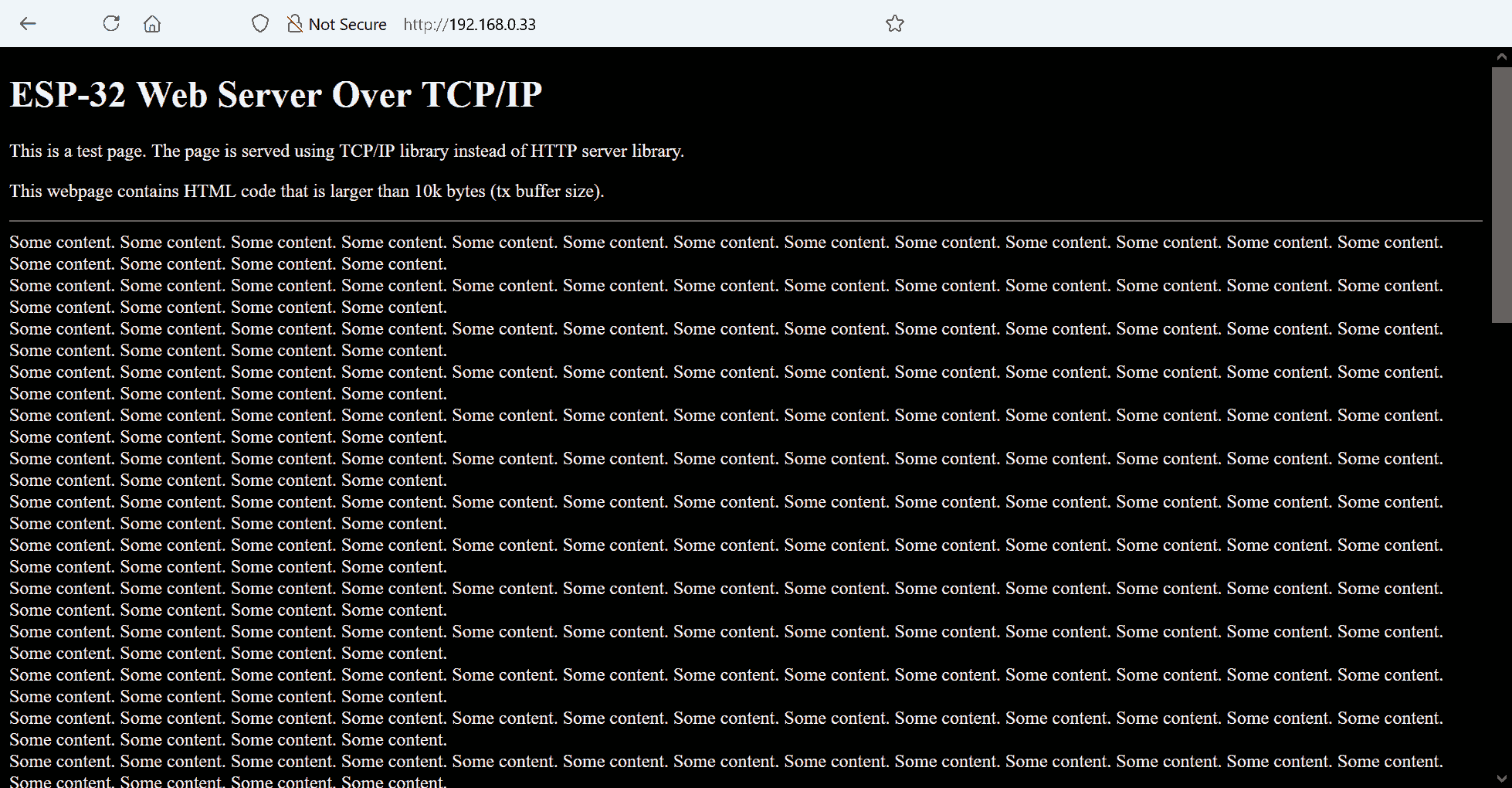
Let's take a look at Wireshark's record on my PC:
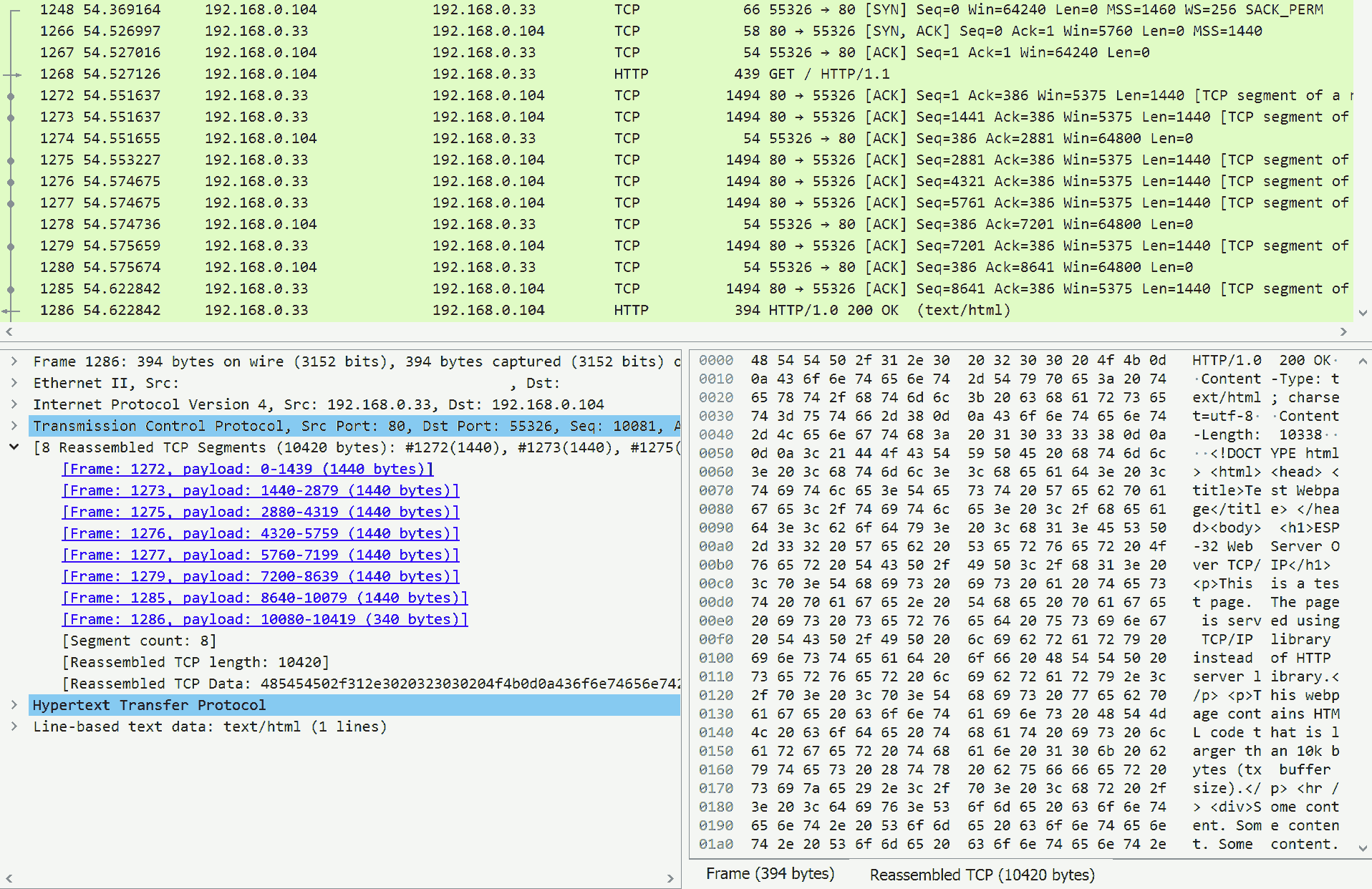
Check the ESP-32 log:

Everything is sent in one shot, even the data we supplied is more than 10k bytes. Huh? Why not two separate calls with 5760 bytes (or some number smaller to accommodate the TCP header) of payload each?
To further study this behaviour, we will make an extreme case, that we will send a binary blob DRAM_ATTR uint32_t sensor_buffer[0x8000] that consumes almost all remaining RAM of ESP-32:
DRAM_ATTR uint32_t sensor_buffer[0x8000];
IRAM_ATTR void tcp_main(void* param) {
	while (1) {
		int sock = accept(tcp_sock, NULL, NULL);

		size_t wp = sprintf(tcp_buffer, "HTTP/1.0 200 OK\r\nContent-Type: application/octet-stream\r\nContent-Length: %d\r\n\r\n", sizeof(sensor_buffer));
		send(sock, tcp_buffer, wp, 0);
		size_t sent = 0, total = sizeof(sensor_buffer);
		while (sent < total) {
			ESP_LOGI("[TCP]", "Sent body %d of %d", (int)sent, (int)total);
			size_t just = send(sock, sensor_buffer + sent, total - sent, 0);
			ESP_LOGI("[TCP]", "Just %d of %d", (int)just, (int)total);
			sent += just;
		}

		shutdown(sock, SHUT_WR);
		close(sock);
	}
}
Fetch this resource. As the console shows, this extremely large binary blob consumes 93 TCP segments:
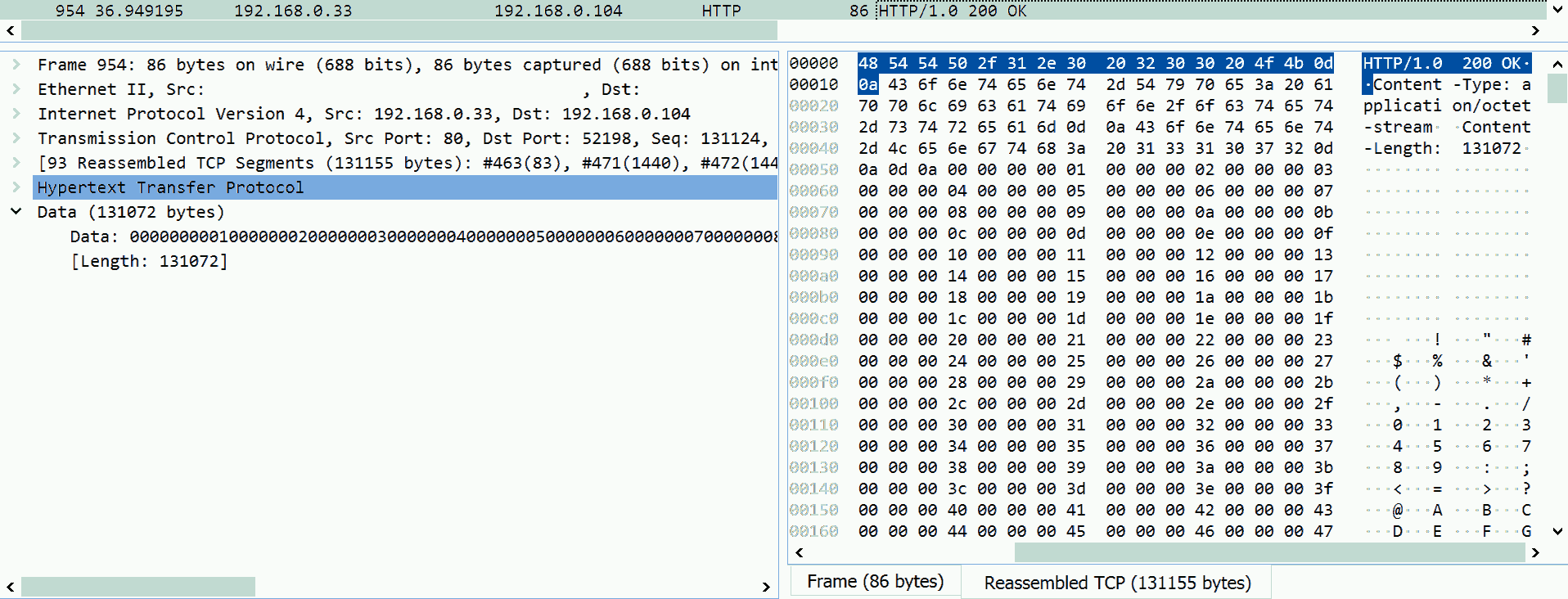
But is sent in one shot:

Keep reading to figure it out, or click here for spoiler
In lwIP, send() returns when the supplied data is fully filled into the TCP/IP buffer.
lwIP TCP Implementation
ESP-IDF uses lwIP to implement the network stacks in the kernel.
lwIP has two modes:
-
Mainloop mode - The application directly accesses the low-level interface of lwIP.
-
OS mode - The application cannot access the low-level interface of lwIP. A dedicated thread is used to host the TCP/IP tasks. The application sends messages to the TCP/IP thread to access the network.
ESP-IDF implements the OS mode.
In this section, we will discuss how lwIP work in:
-
LWIP_NETCONN_FULLDUPLEX = 0- Only one thread can read, write and close a socket. -
LWIP_TCPIP_CORE_LOCKING = 0- Use TCP/IP thread instead of application thread to perform tasks. -
LWIP_SO_LINGER = 0- DisableSO_LINGER.
Simplified source code from lwIP provided.
To send a message to the TCP/IP thread from application thread, invoke netconn_apimsg(lwip_netconn_*, &API_MSG_VAR_REF(msg)) from src/api/api_lib.c, where lwip_netconn_* is the function to be execute in the TCP/IP thread:
static err_t netconn_apimsg(tcpip_callback_fn fn, struct api_msg *apimsg) {
	err_t err = tcpip_send_msg_wait_sem(fn, apimsg, LWIP_API_MSG_SEM(apimsg));
	return err == ERR_OK ? apimsg->err : err;
}
In src/api/tcpip.c:
err_t tcpip_send_msg_wait_sem(tcpip_callback_fn fn, void *apimsg, sys_sem_t *sem) {
	TCPIP_MSG_VAR_DECLARE(msg);
	TCPIP_MSG_VAR_ALLOC(msg);
	TCPIP_MSG_VAR_REF(msg).type = TCPIP_MSG_API;
	TCPIP_MSG_VAR_REF(msg).msg.api_msg.function = fn;
	TCPIP_MSG_VAR_REF(msg).msg.api_msg.msg = apimsg;
	sys_mbox_post(&tcpip_mbox, &TCPIP_MSG_VAR_REF(msg));
	sys_arch_sem_wait(sem, 0);
	TCPIP_MSG_VAR_FREE(msg);
	return ERR_OK;
}
A message is sent to the TCP/IP thread. In ESP-IDF, the FreeRTOS xQueueSendToBack(mbox->mbx, &msg, portMAX_DELAY) is used.
A semaphore is passed with the message from application side to the TCP/IP thread, and it will block the application. In ESP-IDF, the FreeRTOS xSemaphoreTake(sem->sem, timeout_ticks) is used.
This semaphore can be released by the TCP/IP thread with void sys_sem_signal(sys_sem_t *sem). In ESP-IDF, the FreeRTOS xSemaphoreGive(sem->sem) is used. Note this semaphore may be released before the underlying TCP/IP tasks are fully finished.
That means, lwIP is asynchronous. The application (user-space) can only enqueue the command to the TCP/IP thread (kernel-space).
Application Side
lwip_*() implements the standard socket interfaces. In src/include/lwip/socket.h:
#define lwip_send         send
#define lwip_close        close
#define lwip_shutdown     shutdown
lwip_*() provides some parameter check, format conversion, then calls netconn_*(). Afterwards, perform housekeeping. In src/api/scoket.c:
To send() data to the network peer:
ssize_t lwip_send(int s, const void *data, size_t size, int flags) {
	struct lwip_sock sock = get_socket(s);
	u8_t write_flags = NETCONN_COPY | flags;
	size_t written = 0;
	err = netconn_write_partly(sock->conn, data, size, write_flags, &written);
	return err == ERR_OK ? (ssize_t)written : -1;
}
Data will be copied from user-space to kernel-space for send(). lwip_send() does not implement zero-copy send.
To shutdown() the connection:
int lwip_shutdown(int s, int how) {
	struct lwip_sock sock = get_socket(s);
	u8_t shut_rx = x(how), shut_tx = x(how);
	err_t err = netconn_shutdown(sock->conn, shut_rx, shut_tx);
	return err == ERR_OK ? 0 : -1;
}
To close() the connection:
int lwip_close(int s) {
	struct lwip_sock sock = get_socket(s);
	err_t err = netconn_prepare_delete(sock->conn);
	if (err != ERR_OK)
		return -1;
	free_socket(sock, NETCONNTYPE_GROUP(netconn_type(sock->conn)) == NETCONN_TCP);
	return 0;
}
static void free_socket(struct lwip_sock *sock, int is_tcp) {
	free_socket_locked(sock, is_tcp, &conn, &lastdata);
	free_socket_free_elements(is_tcp, conn, &lastdata);
}
static int free_socket_locked(struct lwip_sock *sock, int is_tcp, struct netconn **conn, union lwip_sock_lastdata *lastdata) {
	sock->fd_used--;
	*lastdata = sock->lastdata;
	sock->lastdata.pbuf = NULL;
	sock->select_waiting = 0;
	*conn = sock->conn;
	sock->conn = NULL;
	return 1;
}
static void free_socket_free_elements(int is_tcp, struct netconn *conn, union lwip_sock_lastdata *lastdata) {
	pbuf_free(lastdata->pbuf);
	netbuf_delete(lastdata->netbuf);
	netconn_delete(conn);
}
For TCP/IP connection, close() will free the socket (free the buffer) if the TCP/IP thread success.
netconn_*() calls netconn_apimsg(lwip_netconn_*, &API_MSG_VAR_REF(msg)) to send a message (what to do, on which connection) to the TCP/IP thread. Note this function will block. In src/api/api_lib.c:
For send():
err_t netconn_write_partly(struct netconn *conn, const void *dataptr, size_t size, u8_t apiflags, size_t *bytes_written) {
	return netconn_write_vectors_partly(conn, &(struct netvector vector){.ptr = dataptr, .len = size}, 1, apiflags, bytes_written);
}
err_t netconn_write_vectors_partly(struct netconn *conn, struct netvector *vectors, u16_t vectorcnt, u8_t apiflags, size_t *bytes_written) {
	msg = {
		.conn = conn,
		.msg.w.vector = vectors,
		.msg.w.vector_cnt = vectorcnt,
		.msg.w.vector_off = 0,
		.msg.w.apiflags = apiflags,
		.msg.w.len = size,
		.msg.w.offset = 0
	};
	err_t err = netconn_apimsg(lwip_netconn_do_write, &API_MSG_VAR_REF(msg));
	*bytes_written = API_MSG_VAR_REF(msg).msg.w.offset;
	return err;
}
The API on application-side sends a message including multiple vectors (although only one used) to the TCP/IP thread. Then, the application blocks until TCP/IP thread releases it. At the end, the number of bytes written is passed back in msg.w.offset.
For shutdown():
err_t netconn_shutdown(struct netconn *conn, u8_t shut_rx, u8_t shut_tx) {
	return netconn_close_shutdown(conn, (u8_t)((shut_rx ? NETCONN_SHUT_RD : 0) | (shut_tx ? NETCONN_SHUT_WR : 0)));
}
static err_t netconn_close_shutdown(struct netconn *conn, u8_t how) {
	msg = {
		.conn = conn,
		.msg.sd.shut = how,
		.msg.sd.polls_left = ((LWIP_TCP_CLOSE_TIMEOUT_MS_DEFAULT + TCP_SLOW_INTERVAL - 1) / TCP_SLOW_INTERVAL) + 1
	};
	return netconn_apimsg(lwip_netconn_do_close, &API_MSG_VAR_REF(msg));
}
For close():
err_t netconn_prepare_delete(struct netconn *conn) {
	msg = {
		.conn = conn,
		.msg.sd.polls_left = ((LWIP_TCP_CLOSE_TIMEOUT_MS_DEFAULT + TCP_SLOW_INTERVAL - 1) / TCP_SLOW_INTERVAL) + 1,
	};
	return netconn_apimsg(lwip_netconn_do_delconn, &API_MSG_VAR_REF(msg));
}
TCP/IP Thread - Send
The application sends a message to the TCP/IP thread to start a send task. In src/api/api_msg.c:
void lwip_netconn_do_write(void *m) {
	lwip_netconn_do_writemore((struct api_msg *)m->conn);
}
lwip_netconn_do_write() initiates the write process, change the netconn state to NETCONN_WRITE.
static err_t lwip_netconn_do_writemore(struct netconn *conn, u8_t delayed) {
	err_t err;
	u8_t apiflags = conn->current_msg->msg.w.apiflags;
	u16_t len, available;

	const void *dataptr = (const u8_t *)conn->current_msg->msg.w.vector->ptr + conn->current_msg->msg.w.vector_off;
	size_t diff = conn->current_msg->msg.w.vector->len - conn->current_msg->msg.w.vector_off;
	err = tcp_write(conn->pcb.tcp, dataptr, min(tcp_sndbuf(conn->pcb.tcp), diff), apiflags);
	if (err == ERR_OK) {
		conn->current_msg->msg.w.offset += len;
		conn->current_msg->msg.w.vector_off += len;
		if (conn->current_msg->msg.w.vector_off == conn->current_msg->msg.w.vector->len) { // check if current vector is finished
			conn->current_msg->msg.w.vector_cnt--;
			if (conn->current_msg->msg.w.vector_cnt > 0) { // if we have additional vectors, move on to them
				conn->current_msg->msg.w.vector++;
				conn->current_msg->msg.w.vector_off = 0;
			}
		}
	}
	err_t out_err = tcp_output(conn->pcb.tcp);
	if (conn->current_msg->msg.w.offset == conn->current_msg->msg.w.len) {
		sys_sem_signal(LWIP_API_MSG_SEM(conn->current_msg));
	}
}
lwip_netconn_do_writemore() fills the vectors in the message (that is, the data to send) into TCP/IP buffer with tcp_write(), for at most tcp_sndbuf() bytes (5670 bytes of buffer size in our case, or whatever remaining in that buffer). Then, send them with tcp_output().
Data is fully filled when message offset is the same as its length conn->current_msg->msg.w.offset == conn->current_msg->msg.w.len; in other words, read pointer reaches the end.
If the data to send can be filled in the TCP/IP buffer, send() calls lwip_netconn_do_writemore() and unblocks once the data is filled into the TCP/IP buffer. Application continues on other tasks; at the same time, data is sent in the background.
If the data is too long to be filled into the remaining of TCP/IP buffer, send() blocks. At the same time, data is sent in the background, gradually freeing the TCP/IP buffer. On the other hand, lwip_netconn_do_writemore() can be called by sent_tcp() or poll_tcp() (like a periodic retry), gradually refilling the TCP/IP buffer and continuing the sending process. When the data is fully filled into the TCP/IP buffer, send() unblocks.
Therefore, on the application side, the send() call will always send the entire buffer in one shot.
However, it is safer to keep the compare-and-resend-remaining loop when calling send() in our code as it is recommended by the interface manual, this should save us if we change to a different underlying library.
This is not the case for non-bocking send(..., MSG_DONTWAIT).
To fill the TCP/IP buffer, err_t tcp_write(struct tcp_pcb *pcb, const void *arg, u16_t len, u8_t apiflags) from src/core/tcp_out.c will:
-
Segment the supplied data into smaller segments that fits into MSS or the remaining TCP/IP buffer (which is smaller).
-
Create TCP segments for the data, add TCP headers.
-
Enqueue the TCP segments.
To initiate the TCP segments sending, err_t tcp_output(struct tcp_pcb *pcb) from src/core/tcp_out.c will:
-
Check the send window size. If too small, send an empty
ACKand retry later. -
Check
ACK,SEQand other numbers. -
Call
static err_t tcp_output_segment(struct tcp_seg *seg, struct tcp_pcb *pcb, struct netif *netif)to send the packet over IP.
We can modify the config to print some lwIP log in menuconfig:
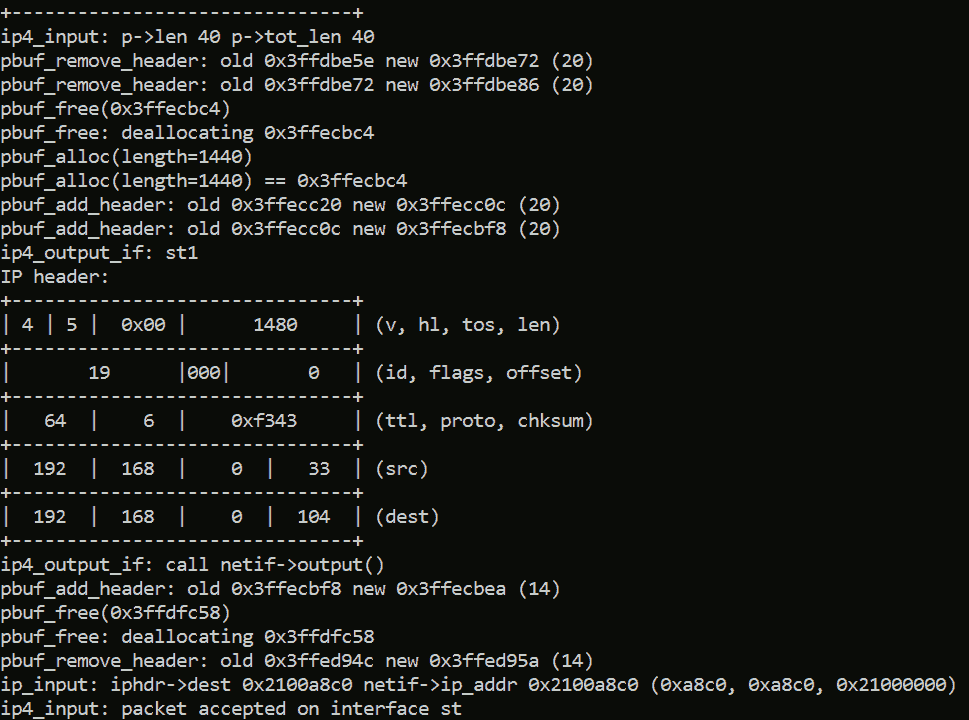
As we can see the lwIP is internally allocating and deallocating memory to create TCP/IP packet as the data is sending.
In conclusion:
-
In user-space, we can supply a buffer larger than kernel-side TCP buffer size or MSS to the
send()call, and send the entire buffer in one shot. -
The upper layer of the lwIP library (
api_msg.c), the user-supplied buffer is gradually filled into the 5760 bytes long kernel-side TCP/IP buffer in a loop, blocks until fully buffered (but not fully sent yet). -
In the lower layer of the lwIP library (
tcp_out.c), the data in the TCP/IP buffer is divided into smaller TCP segments to fit into MSS. -
send()enqueues the data into a TCP/IP buffer. Whensend()returns, the data is still in progress.
TCP/IP Thread - Shutdown
Shutdown the write side of the connection after filling the TCP/IP buffer but before closing it. In src/api/api_msg.c:
void lwip_netconn_do_close(void *m) {
	struct api_msg *msg = (struct api_msg *)m;
	msg->conn->current_msg = msg;
	lwip_netconn_do_close_internal(msg->conn);
}
To shutdown the write side, only the following statements will be executed:
static err_t lwip_netconn_do_close_internal(struct netconn *conn, u8_t delayed) {
	struct tcp_pcb *tpcb = conn->pcb.tcp;
	tcp_sent(tpcb, NULL);
	err = tcp_shutdown(tpcb, shut & NETCONN_SHUT_RD = 0, shut & NETCONN_SHUT_WR = 1);
	conn->current_msg->err = err;
	conn->current_msg = NULL;
	sys_sem_signal(LWIP_API_MSG_SEM(conn->current_msg));
}
lwip_netconn_do_close_internal() will:
-
Remove the
send()handler; so, no more send allowed. -
Call
err_t tcp_shutdown(struct tcp_pcb *pcb, int shut_rx, int shut_tx)to close the write side of the TCP connection, whereshut_rxis 0 andshut_txis 1. -
Release the application thread.
Since current pcb state is ESTABLISHED (socket from accept()), and to shutdown the write side only, only the following statements will be executed in src/core/tcp.c:
err_t tcp_shutdown(struct tcp_pcb *pcb, int shut_rx, int shut_tx) {
	return tcp_close_shutdown(pcb, (u8_t)shut_rx = 0);
}
static err_t tcp_close_shutdown(struct tcp_pcb *pcb, u8_t rst_on_unacked_data) {
	return tcp_close_shutdown_fin(pcb);
}
static err_t tcp_close_shutdown_fin(struct tcp_pcb *pcb) {
	tcp_send_fin(pcb);
	pcb->state = FIN_WAIT_1;
	tcp_output(pcb);
	return ERR_OK;
}
tcp_send_fin(pcb) from src/core/tcp_out.c may enqueue a new empty FIN packet, or, it may set the FIN flag in the last packet in the queue.
Once the FIN packet is placed into the queue, the pcb state changes to FIN_WAIT_1. The application thread unblocks.
In conclusion:
-
The state is
ESTABLISHEDwhen we shutdown the write side of the socket. -
The write handler is removed to prevent future writing.
-
shutdown(sock, SHUT_WR)will enqueue aFINpacket, or set theFINflag in the last packet. -
Similar to
send(), whenshutdown()returns, theFINpacket is still in the queue.
TCP/IP Thread - Close
Close the TCP/IP connection. In src/api/api_msg.c:
void lwip_netconn_do_delconn(void *m) {
	struct api_msg *msg = (struct api_msg *)m;
	netconn_drain(msg->conn);
	msg->msg.sd.shut = NETCONN_SHUT_RDWR;
	msg->conn->current_msg = msg;
	lwip_netconn_do_close_internal(msg->conn);
}
lwip_netconn_do_close_internal() will:
-
Call
static void netconn_drain(struct netconn *conn)to deletercvmboxandacceptmbox. Discard unread data and abort unaccepted connections. -
Shutdown both write and read sides of the connection.
Then, shutdown both write and read sides, only the following statements will be executed:
static err_t lwip_netconn_do_close_internal(struct netconn *conn, u8_t delayed) {
	struct tcp_pcb *tpcb = conn->pcb.tcp;
	tcp_*(tpcb, NULL);
	err = tcp_close_ext(tpcb, 1);
	conn->current_msg->err = err;
	conn->current_msg = NULL;
	sys_sem_signal(LWIP_API_MSG_SEM(conn->current_msg));
}
lwip_netconn_do_close_internal() will:
-
Remove all handlers; so, no more operation allowed.
-
Call
err_t tcp_close_ext(struct tcp_pcb *pcb, u8_t rst_on_unacked_data)to close the TCP/IP connection, whererst_on_unacked_datais 1. -
Release the application thread.
Both shutdown() and close() call lwip_netconn_do_close_internal(). The difference is:
-
shutdown(tcp, SHUT_RD ^ SHUT_WR)invokestcp_shutdown()when shutdown only one side (read OR write). -
shutdown(tcp, SHUT_RDWR)invokestcp_close_ext()when shutdown both sides (read AND write). -
close(tcp)is equivalent toshutdown(tcp, SHUT_RDWR)when shutdown both sides. It invokestcp_close_ext(); however,close(tcp)frees the socket on the application side.
Since current pcb state is FIN_WAIT_1 (changed by tcp_close_shutdown_fin() from shutdown(sock, SHUT_WR)), only the following statements will be executed in src/core/tcp.c:
err_t tcp_close_ext(struct tcp_pcb *pcb, u8_t rst_on_unacked_data) {
	return tcp_close_shutdown(pcb, rst_on_unacked_data = 1);
}
static err_t tcp_close_shutdown(struct tcp_pcb *pcb, u8_t rst_on_unacked_data) {
	return tcp_close_shutdown_fin(pcb);
}
static err_t tcp_close_shutdown_fin(struct tcp_pcb *pcb) {
	return ERR_OK;
}
Nothing significant on the TCP/IP side.
However, if we didn't shutdown the connection, current pcb keeps ESTABLISHED, only the following statements will be executed in src/core/tcp.c:
err_t tcp_close_ext(struct tcp_pcb *pcb, u8_t rst_on_unacked_data) {
	return tcp_close_shutdown(pcb, rst_on_unacked_data = 1);
}
static err_t tcp_close_shutdown(struct tcp_pcb *pcb, u8_t rst_on_unacked_data) {
	if (rst_on_unacked_data && ((pcb->state == ESTABLISHED) || (pcb->state == CLOSE_WAIT))) {
		tcp_rst(pcb, pcb->snd_nxt, pcb->rcv_nxt, &pcb->local_ip, &pcb->remote_ip, pcb->local_port, pcb->remote_port);
		tcp_pcb_purge(pcb);
		return ERR_OK;
	}
}
tcp_send_fin(pcb) from src/core/tcp_out.c sends a RST packet immediately (instead of enqueue).
tcp_pcb_purge(pcb) from src/core/tcp.c then removes any buffered data (unsent and unacked).
In conclusion:
-
close()frees the socket on the application side. -
Call
close()aftershutdown(sock, SHUT_WR)does nothing on the TCP/IP side. -
Call
close()withoutshutdown(sock, SHUT_WR)sends aRSTpacket and purges the TCP/IP buffer.
Other optimization
Completely Eliminate printf()-family Function
In the previous example, we print the HTTP header using sprint() function:
#define HTTP_HEADER_TEXTHTML "HTTP/1.0 200 OK\r\nContent-Type: text/html; charset=utf-8\r\nContent-Length: %d\r\n\r\n"
DRAM_ATTR char tcp_buffer[12000];

size_t wp = sprintf(tcp_buffer, HTTP_HEADER_TEXTHTML, sizeof(html_index));
memcpy(tcp_buffer + wp, html_index, sizeof(html_index));
send(sock, tcp_buffer, wp + sizeof(html_index), 0);
As mentioned before, printf()-family is expensive:
-
It requires a parser for the format string.
-
It is a complex (and large) function that we do not need all its fancy functionalities.
Because it is complex and large, some embedded applications implement light-weight
printf()-family function, especially lacking floating-point number support.
All we need are copying the memory and printing numbers. ESP-32 provides a binary to text conversion function in ROM:
int esp_rom_cvt(unsigned long long val, long radix, int pad, const char *digits, char *buf);
Now, we can rewrite the previous code to:
#define HTTP_HEADER_TEXTHTML "HTTP/1.0 200 OK\r\nContent-Type: text/html; charset=utf-8\r\nContent-Length: "
DRAM_ATTR char tcp_buffer[12000] = HTTP_HEADER_TEXTHTML;

//memcpy(tcp_buffer, HTTP_HEADER_TEXTHTML, sizeof(HTTP_HEADER_TEXTHTML) - 1); // Not required to refill header
char* dest = tcp_buffer + sizeof(HTTP_HEADER_TEXTHTML) - 1; // Do not include the zero-terminator
dest += esp_rom_cvt(sizeof(html_index), 10, 0, "0123456789", dest);
*(dest++) = '\r';
*(dest++) = '\n';
*(dest++) = '\r';
*(dest++) = '\n';
memcpy(dest, html_index, sizeof(html_index) - 1);
send(sock, tcp_buffer, dest - tcp_buffer + sizeof(html_index) - 1, 0);
The HTTP header can be divided into two portions: the static portion contains HTTP 200 status code, the content type and the name for content length; the dynamic portion contains the payload length.
-
We will use
memcpy()to write the static portion. If we only serve HTML payload, we only do this once when the program initializes. -
Use
esp_rom_cvt()to convert the length number to text, append it to the end of the static portion. Since the static portion of the headerHTTP_HEADER_TEXTHTMLis a C-style string with zero-terminator at the end, we usesizeof(HTTP_HEADER_TEXTHTML) - 1to exclude it. -
End the last line of the header (that is, after the content length number) with
\r\n.
Append an empty line \r\n.
Copy the payload after the empty line. Since the payload html_index is a C-style string with zero-terminator at the end, we use sizeof(html_index) - 1 to exclude it.
Fully Static Buffer
Since the HTML file is static, its length is known at compile time. That means, the Content-Length HTTP header can be resolved at compile time. Therefore, the HTTP header is static. We can combine the HTTP header and payload in one constant string:
const char index_http[] = "HTTP/1.0 200 OK\r\nContent-Type: text/html; charset=utf-8\r\nContent-Length: 82\r\n\r\n<!DOCTYPE html><html><head><title>123</title></head><body><p>456</p></body></html>";
send(sock, index_http, sizeof(index_http), 0);
In this way, there is no more memory copy, no buffer required, and there is only one send() call.